Built-In Actions
VB Studio provides a set of built-in actions that you use to create your action chain. If an action you need isn’t available in the Actions palette, use the Code action to add your own block of code, or if a future need warrants it, create a custom action that can be reused.
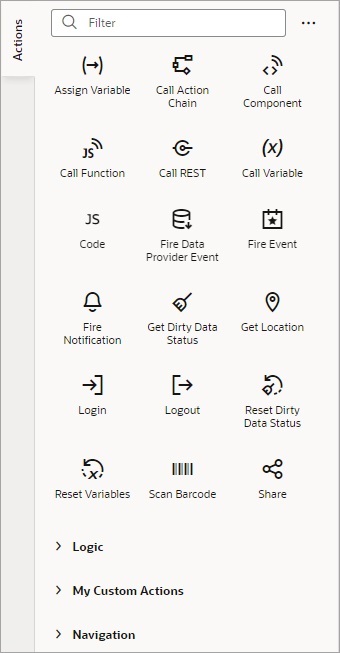
Each action performs a specific function and requires you to set different properties. For example, when you add the Call REST action to your action chain, you need to specify the endpoint and other details about the response to the Call REST action. Similarly, when you add a Navigate To Page action, you’ll need to select a page in your current application to navigate to:
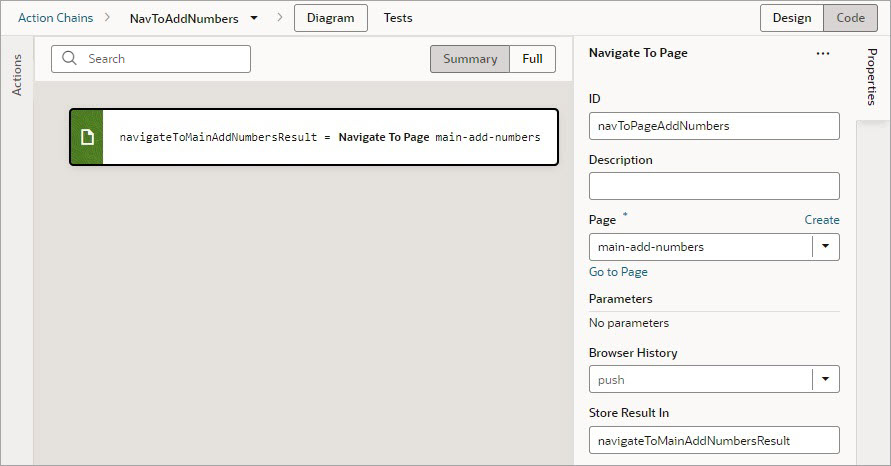
You can add an action in one of three ways, depending on your preference and where you want it added:
-
Drag and drop the action from the Actions palette onto the bottom edge of the action it’s to follow, or onto the top edge of the action it’s to precede.

Description of the illustration jsac-add-before-or-after-action.png
-
Double-click the action in the Actions palette to add it to an empty canvas or to the end of an action chain.
-
Select the action on the canvas that you want the new action to follow, then double-click the new action in the Actions palette.
If you need more details about an action than are provided in this section, refer to the JavaScript Actions section in the Oracle Visual Builder Page Model Reference.