Enable Client-Side Validation for a Form
You may want to set up a form so that your application can check the validity of its contents before the user submits it.
To do this, surround the form with an oj-validation-group element, and add a custom isFormValid Javascript function that returns a boolean. You can then call that function before the form is submitted.
Suppose you have a form with three text fields. To set up a basic client-side validation for this form:
-
Open the page that contains the form.
-
Click the Code button to switch to the code view of the page.
-
Locate the
divelement that contains theoj-form-layoutelement. If it isn’t already, enclose thisdivelement in anoj-validation-groupelement that has anidattribute. For example:<oj-validation-group id="CreateForm">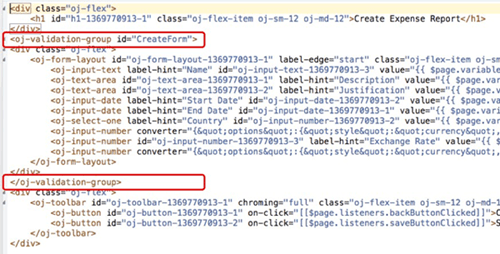
Description of the illustration common-clientval-element.png
Make sure to add the closing tag.
-
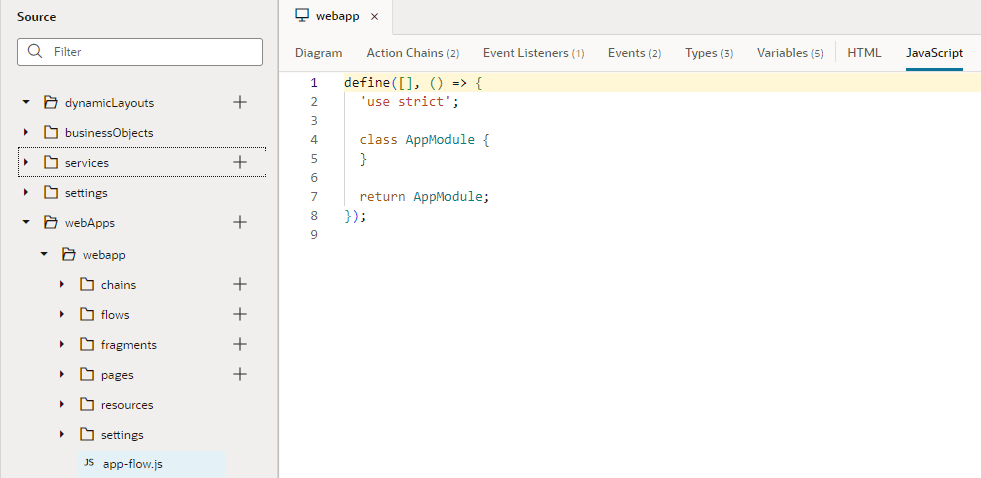
Click Source View in the Navigator, then find your application’s
app-flow.jsfile:
-
Add the
isFormValidfunction as shown here (the function code appears in bold):var AppModule = function AppModule() {}; AppModule.prototype.isFormValid = function(form) { var tracker = document.getElementById(form); if (tracker.valid === "valid") { return true; } else { tracker.showMessages(); tracker.focusOn("@firstInvalidShown"); return false; } }; return AppModule; -
Go back to the page with the form. Click the Save button, then select the Action Chains tab for the button and click createExpenseReportChain.
-
If an If action does not exist:
-
Drag an If action after Start.
-
In the Condition field, enter:
{{ $application.functions.isFormValid("CreateForm") }}The argument to the
isFormValidfunction is theidvalue for theoj-validation-groupelement. -
Move the Call REST businessObjects/... node to the true branch of the If action. For example:
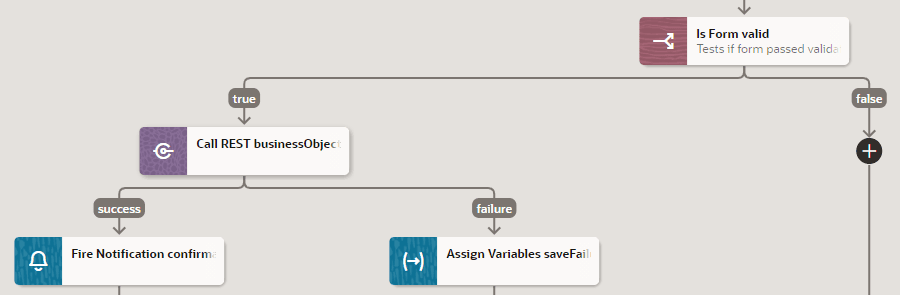
Description of the illustration common-clientval-acchain.png
-
You can now test the form validation.