Set a Default Value for a Field
You can set a default value for a field if the user does not provide a value for it. Based on the field’s data type, you might be able to set a static value or an expression as the default.
To set a default value for a field:
- Open your business object’s Fields editor and select the field you want to modify.
- In the field’s Properties pane, select Set to default if value not provided.
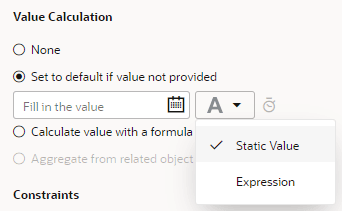
- Choose to define a static value or construct an expression:
- To set a static value, select Static Value (selected by default) and enter a value:
-
To set an expression, select Expression from the drop-down list, then construct an expression in the Expression Builder. Specify operands by typing in the text area or click an operator in the toolbar to add it to your expression. You can also select the Insert arrow for a field in the Business Objects tab or for a function in the Functions tab.
For example, to set the current date as the default hire date for an employee, you might enternow()as the expression for the Hire Date field:
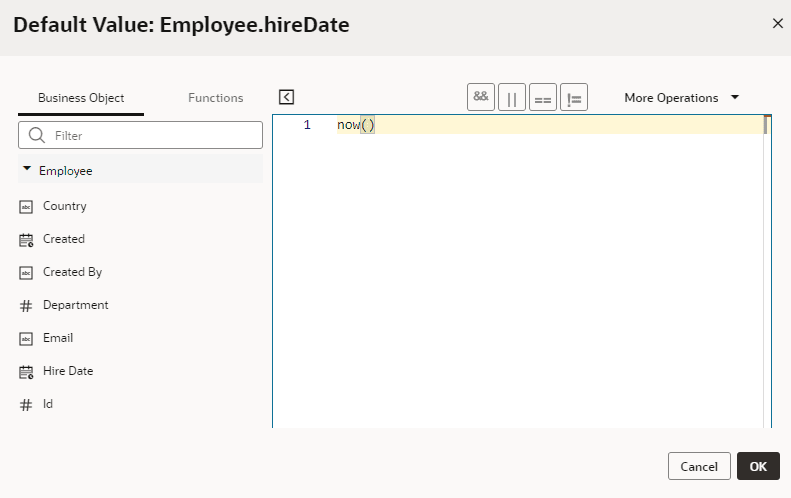
  [Description of the illustration defaultvalue-expression.png](./img_text/defaultvalue-expression.html)

  Click **OK**.
- To set a static value, select Static Value (selected by default) and enter a value:
A field’s default value won’t be visible to users when they access the field. That’s because the value is added just before the record is stored in the business object’s database.
If you defined a Groovy expression for a field’s default value, you can optionally override the default Groovy timeout by clicking the  icon in the Properties pane.