Configure the Jenkins Job to Set an Authentication Token and Accept Build Parameters
To trigger the Jenkins job when it receives a notification from VB Studio, configure it to accept the Git repository’s branch name as a parameter and set an authentication token.
-
Log on to Jenkins.
-
Create or open the job.
-
On the left side of the page, click Configure.
-
Click the Job Notifications tab.
-
Select the This project is parameterized check box.
-
From Add Parameter, select String Parameter.
-
In Name, enter
GIT_REPO_BRANCH. -
In Default Value, enter the review branch name. Example:
patchset_1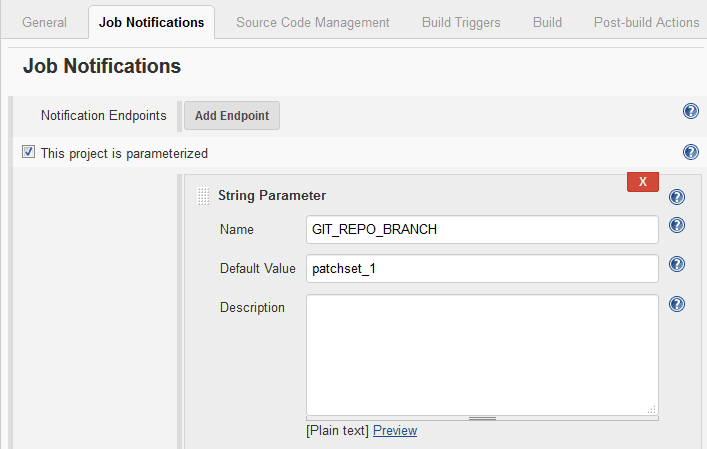
Description of the illustration jenkins-build-parameters.png
-
Click the Build Triggers tab.
-
Select the Trigger builds remotely (e.g., from scripts) check box.
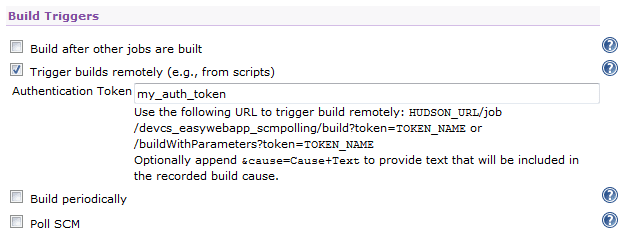
Description of the illustration hudson-build-trigger-authentication-token.png
-
Enter a unique string as a token. You can enter any string value. Example:
my_auth_tokenMake sure that the authentication token isn’t used in any other job.
-
Continue to configure the job.
-
When you’re finished, click Save.