Set Up Git on Hudson
You must be assigned the Admin role of Hudson to set up Git on it. Git must also be installed on the computer running Jenkins. If the plugin is already installed and configured, ignore this section.
-
Log on to Hudson using the administrator credentials.
-
From the links on the left side of the page, click Manage Hudson.

-
To install the Git plugin, click Manage Plugins.
-
In the Available tab, click the Search subtab, search for
Git, select the Hudson GIT plugin check box, and click Install.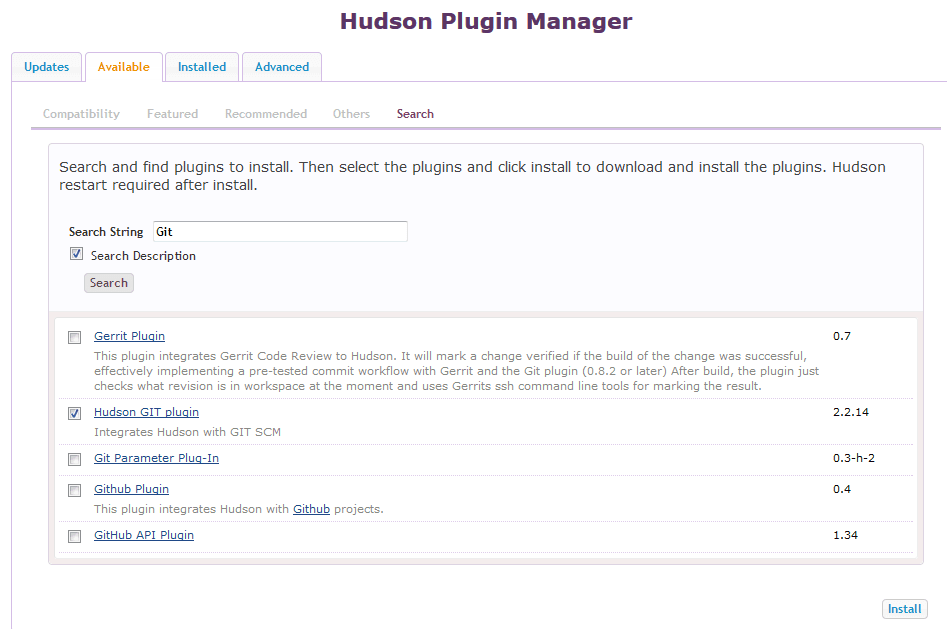
-
Wait for the plugin to install.
-
Restart Hudson.
-
From the links on the left side of the page, click Manage Hudson.
-
Click Configure System.
-
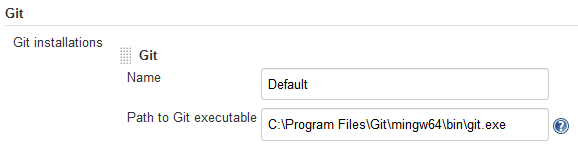
In Git, enter the local path of the Git executable.
-
Click Save.