Example: Using Global Rules to Set Multiple Attribute Values
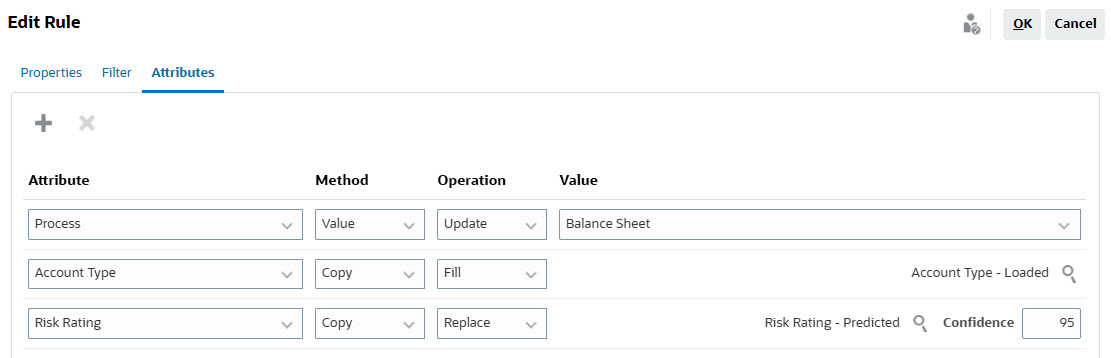
This example creates a global rule, of type Set Attribute Value, that sets the values of three profile attributes.
For profiles that meet the specified filter conditions, the global rule runs before reconciliations are created for a period and sets the values of the following profile attributes:
- Risk Rating - replace its value with that in the predicted attribute
Risk
                    Rating - Predicted
, if the prediction confidence is equal to or greater than 95. - Process - update its value with that in the system attribute
Balance
                    Sheet
, if the current value in Process is not null. - Account Type - copy value of the balance attribute
Account Type -
                    Loaded
, if the value in Account Type is null.
Prerequisites
- You are assigned the Service Administrator role
- The following attributes exist:
- Predicted attribute named
Risk Rating - PredictedThe confidence attribute associated with the predicted attribute is automatically created.
- System attribute named
Balance Sheet - Balance attribute named
Account Type - Loaded
- Predicted attribute named
Steps to Create the Global Rule
- From the Home page, select Application, and then Configuration.
- Select the Global Rules tab.
- Select New to display the New Rule dialog.
- In the Properties tab:
- In Name, enter gr_set_profile_attr_values.
- In Rule, select Set Attribute Value.
- Under Profile, select Before Copied to Period.
- Select Enabled.
- In the Filter tab, click Create
Condition to define the conditions under which the global rule
runs. This rule runs for all valid profiles with Account between 1000 and
3999.

- In Condition, set the following values:
- Source - Profile
- Attribute - Valid
- Operator - Equals
- Value - Yes
- Click Create Condition, and then set the
following under Condition:
- Conjunction - And
- Source - Profile
- Attribute - Account
- Operator - Between
- Value - 1000
- And - 3999
- In Condition, set the following values:
- In the Attributes tab, click New
to create the attribute whose values must be set. In this example, values of
three profile attributes are set. The following image shows the attribute
settings.
- Select OK to save the global rule definition.