Incremental
The Data Warehouse must continuously be in sync as the source data changes over time.
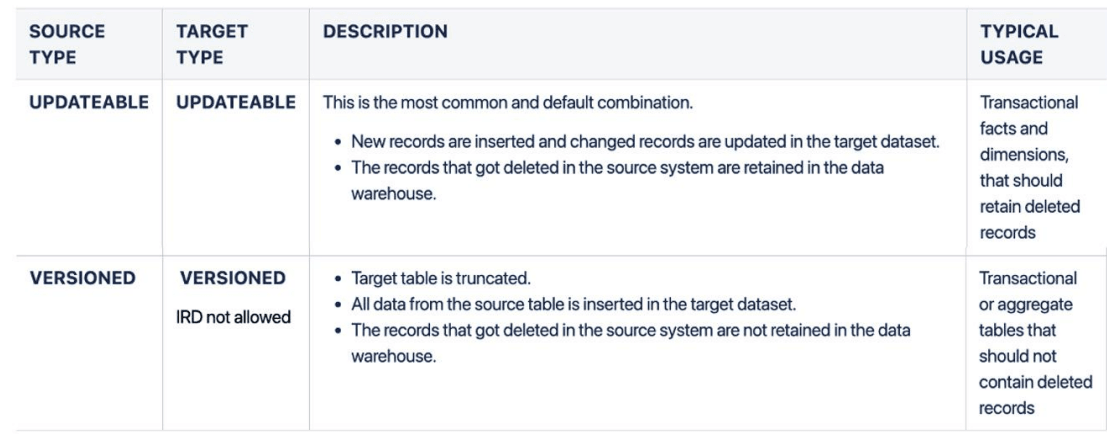
The UPDATEABLE and VERSIONED table types provide options for refreshing data.
When you run the first ETL job for a data application with UPDATEABLE or VERSIONED table types, the data in the source system or staging area and the target data warehouse are the same.
- Full Refresh: Copies all the data from the source system to the data warehouse.
- Incremental Refresh: Processes only the data that was newly added or modified since the last load from the source system to the data warehouse. Incremental refreshes are preferred because they enable faster and more efficient updates with minimal impact on system resources.
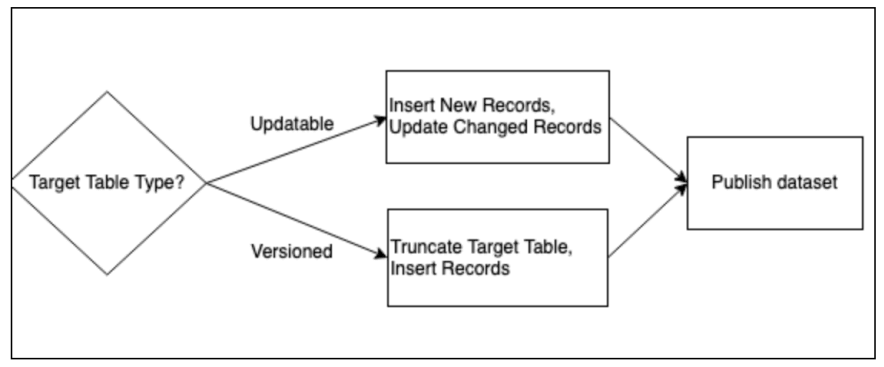
- VERSIONED: The system extracts all the data from the source table.
The data in the mirror copy is truncated and loaded again from the source system. Deleted records aren't retained in the data warehouse.
Example:IMPORT VERSIONED SOURCE SALESAll data from
SALESis extracted. - UPDATEABLE: The system extracts only the changed records from the source, and updates only the changed data in the mirror copy of the extracted data.
Deleted records are retained in the data warehouse.
Example:IMPORT UPDATEABLE SOURCE SALES WITH LUD[LAST_UPDATE_DATE]Only the changed records from
SALESare extracted.Note:
Deleted records need additional handling because they are no longer in the source and can't be included in the extracted data.
- VERSIONED: The system extracts all the data from the source table.
Deleted records aren't retained in the data warehouse.
Example:
IMPORT VERSIONED SOURCE SALES

DEFINE VERSIONED DATASET DW_SALES_FACT FROM SALES END
The SALES dataset is fully refreshed even if some records don't have any updates.
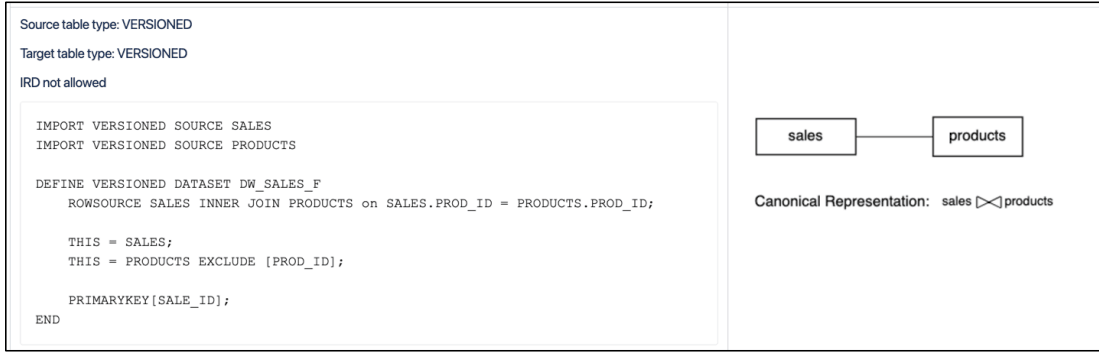
Description of the illustration dasrg-target-versioned.png - UPDATEABLEThe incremental refresh directive (IRD) identifies which dataset drives changes for the insert or update selection. When you assign a source as the change-driving dataset:
- ETL processes consider all change records in the driving source and their matching records in other sources.
- If a non-driving source has changes that do not have matching changes in the driving source, the process ignores these changes during the incremental refresh.
You must specify the IRD for any dataset that uses two or more sources.
When defining a target dataset in the Data Augmentation Scripts application, you must decide its incremental data refresh behavior.
If the table type is UPDATEABLE, you have to nominate the input tables that are driving the changes using the incremental refresh directive (IRD) of REFRESH ON CHANGES in the target dataset.IMPORT UPDATEABLE SOURCE SALES DEFINE UPDATEABLE DATASET DW_SALES_FACT FROM SALES ENDNew and updated records in
SALESare updated in the target datasetDW_SALES_FACT.This directive within the DEFINE DATASET block handles the complexity of change detection and updating of the target datasets. You don't have to write boilerplate code to detect changes and deal with complex logic for updating target datasets.
The directive also provides predictability in the incremental refresh behavior:
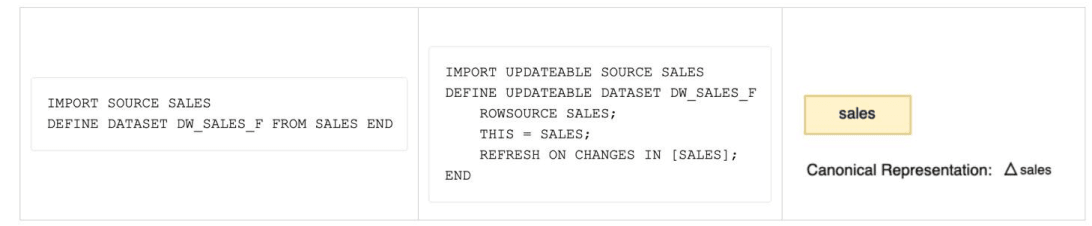
- When only one input table is used to create an UPDATEABLE dataset, the <incremental-refresh-directive> and the change driving input table are inferred.
In the following diagram, the two lines of code illustrate how to create the dataset and define its incremental refresh behavior.
In this example, only the changed records from Sales are brought in.
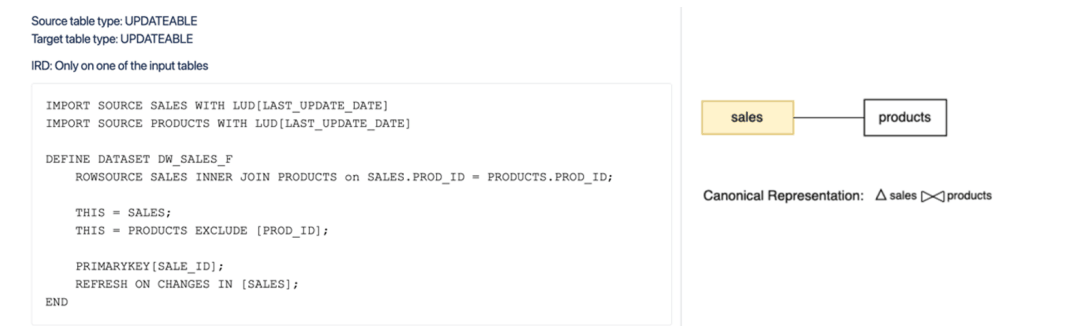
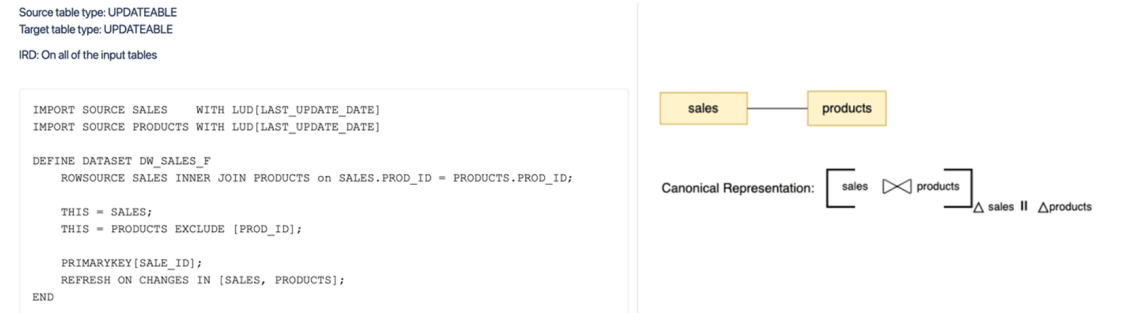
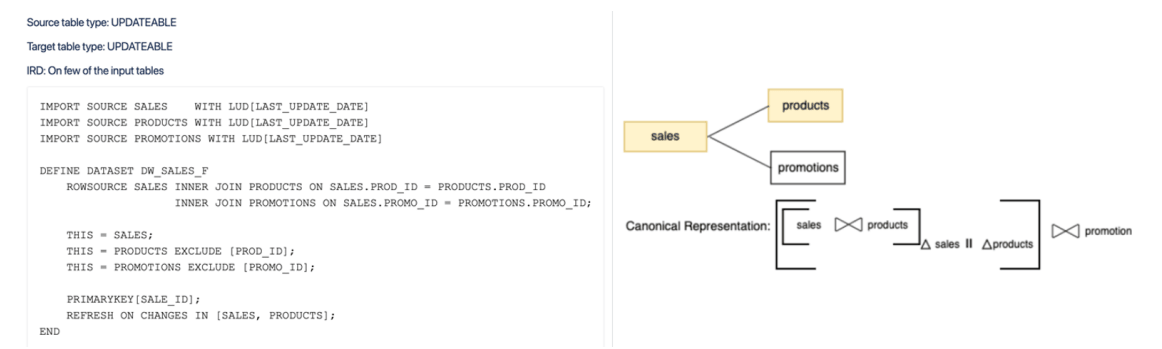
- When multiple input tables are used to create an UPDATEABLE dataset, you must explicitly specify which input tables are the change driving tables in the <incremental-refresh-directive>.
Changed records from the driving tables identify the delta and then considers only the corresponding matching records from the non-driving tables. Changes in the non-driving tables by themselves are ignored.
In this example, Sales is the change-driving table. Only the changed (△) records from Sales are joined with Products.
-
In this example, Sales and Products are both change-driving tables. The changed (△) records from both tables are brought in.
-
In this example, changed (△) records from both change-driving tables Sales and Products are joined with the non-change driving table Promotions.