Configure Frequent Data Refresh with Original Refresh Mechanism

You can schedule frequent data refreshes of the applicable functional areas, prioritized datasets, and warehouse tables to ensure that the incremental data in these is the latest.

Ensure that Frequent Refresh is enabled in Pipeline Features under the Generally Available Features tab on the Enable Features page prior to scheduling frequent data refreshes. See Enable Generally Available Features.

  1. Sign in to your service.
  2. In Oracle Fusion Data Intelligence Console, click Data Configuration under Application Administration.
  3. On the Data Configuration page, under Configurations, click Pipeline Settings.
  4. On the Pipeline Settings page, click Frequent Data Refresh Schedule.
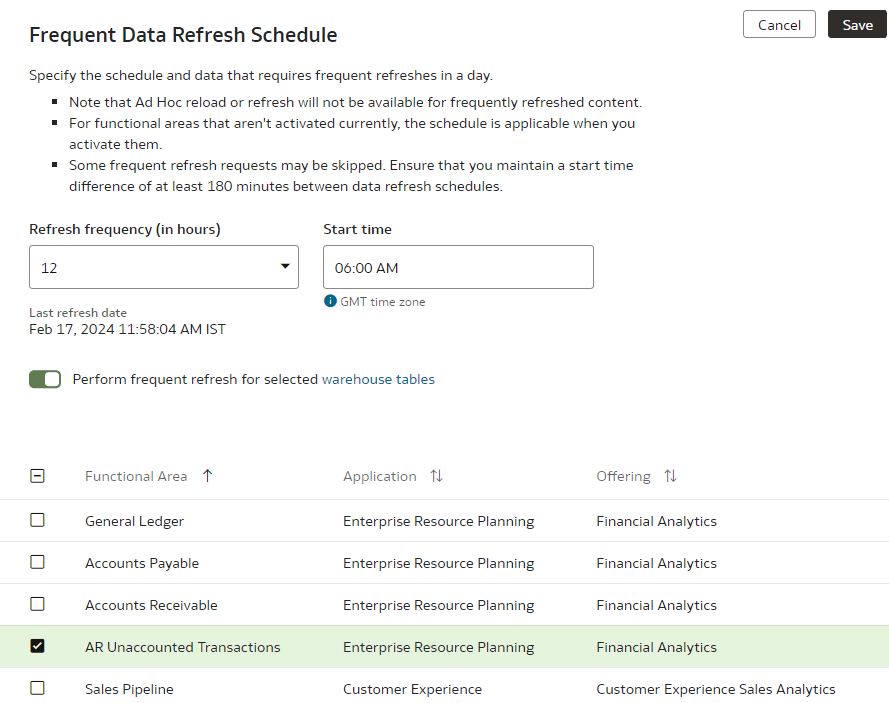
  5. In the Frequent Data Refresh Schedule tab, in Refresh Frequency (in hours), select the number of hours after which you want the data refresh to happen.
  6. Enter a start time in Start time.
  7. In Last refresh date, view the date when the data was last refreshed.
  8. If you've enabled the "Frequent Refresh Tables" preview feature and saved your selection of the warehouse tables, then select the Perform frequent refresh for selected warehouse tables toggle. Click the "warehouse tables" hyperlink to view or update your selection of the warehouse tables in the Frequent Refresh Tables tab.
  9. Select the check boxes for the functional areas with the data you want refreshed at the specified interval.
  10. Click Save.