Use the Oracle Analytics AI Assistant as a Consumer User

A consumer user can ask questions within a specific business context of the Oracle Analytics AI Assistant and see the answers in the form of visualizations

  1. Log in as a consumer user and go to the Home page.
  2. Open a workbook. You can import a sample workbook provided by Oracle or create a workbook based on a subject area enabled for the Oracle Analytics AI Assistant.
  3. Click the Auto Insights icon in the menu bar and select the Assistant tab.
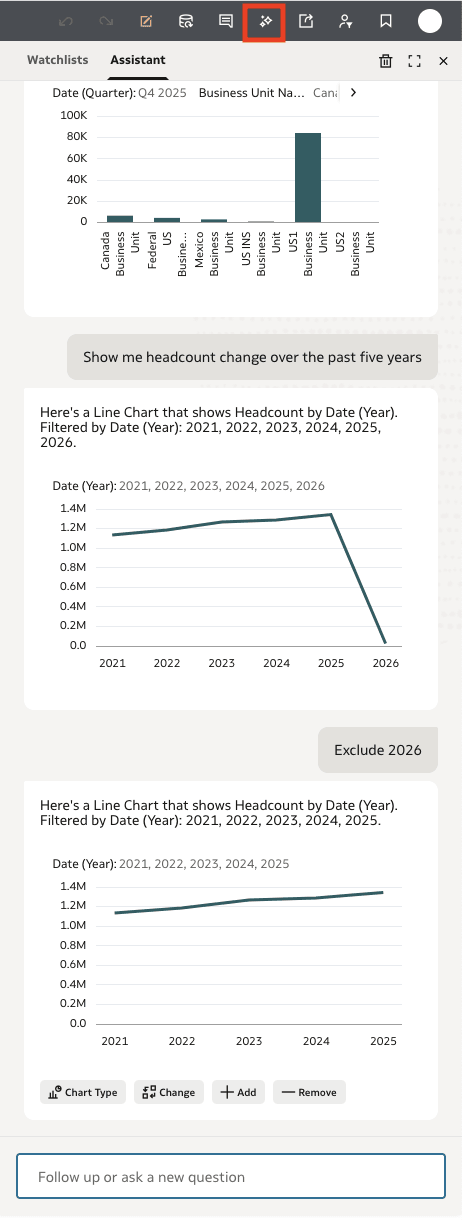
  4. Enter text similar to "Show me headcount change over the past five years" or, leveraging a synonym configured earlier "Show me the workforce size for all business units in the last quarter".
    You'll see a chart as a result. Modify the type of chart as needed or ask additional questions
  5. The Oracle Analytics AI Assistant uses context carry-forward. Ask follow-up questions as needed and edit chart types or other parameters. For example, enter text like "Add region" or "Show this as a line chart".
    • Click Clear Assistant History to reset the context and begin a new analysis path
  6. When you find visualizations you like, add them to the Canvas.
For additional details about using the Oracle Analytics AI Assistant, see Guidelines for Optimal Performance – Consumer Users.