Schedule Data Maintenance
You can schedule full data loads separately using the Data Maintenance configuration to avoid affecting the incremental refresh.
Data maintenance involves scheduling reloads of activated functional areas and deployed data applications to ensure all data is completely reloaded. To ensure that the data in the warehouse is consistent, in certain situations, a full reload of modules is required. For example, when you've deleted data in the source and you want the data in the warehouse to reflect those changes, a full reload of those functional areas is required. Another example is when there is a structural change in the data augmentation because the attributes and column options are edited or you're using data augmentations as versioned datasets, the system does a full reload. These full loads typically take long time to run and can slow down the daily incremental refresh. When you deploy the data augmentations through bundles, the system considers the applicable data augmentations as structural changes and refreshes them with data maintenance.
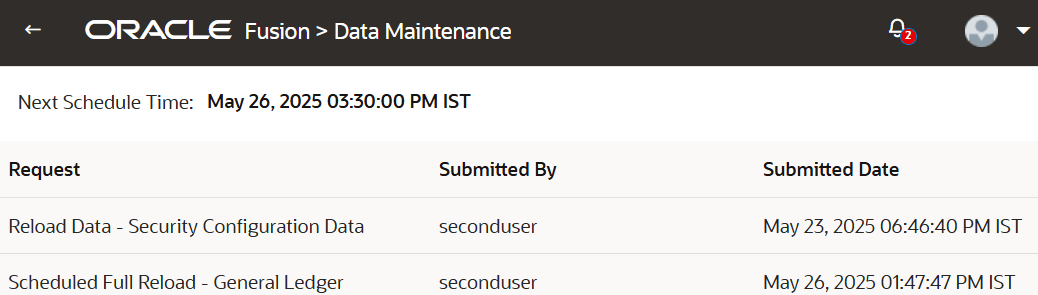
With the data maintenance configuration, you can schedule execution of these full loads so that they don’t unnecessarily affect the incremental refresh. You can change the data maintenance schedule or leave the default schedule details. If you retain the default schedule, the system runs the full loads after the daily incremental refresh is completed. If you update the default schedule for data maintenance, then the system runs the full loads at the scheduled time. If the schedules for daily refresh and data maintenance overlap or conflict, the system runs the daily refresh first. You can view such scheduled refreshes on the Data Maintenance page.
The system creates the default data maintenance schedule after running the incremental refresh with activated modules. If the incremental refresh has no activated modules, the system won’t schedule data maintenance request even if data maintenance is enabled in your instance.
The full reload schedule doesn’t display the last refresh date because full reload modules get refreshed with data maintenance requests. When the full reload and data maintenance schedules don’t match, the next data maintenance includes the full reload functional areas. For example, data maintenance is scheduled weekly on "Tuesday" and full reload is scheduled weekly on "Wednesday", then the next tuesday’s data maintenance includes the previous wednesday’s full reload functional areas.
- Under Pipeline Parameters, in Data Maintenance Schedule,
specify the following:
- Interval: Select the refresh interval such as Daily, Weekly, Monthly, or Quarterly.
- Time: Select the refresh start time.
- Timezone: Select applicable timezone based on your refresh time.
Note:
The start and end of daylight-saving times may affect the data refresh process.
- On the Data Maintenance page, verify the next schedule time and the requests
for full load of functional areas and reload of specific data.