Configure Dynamic Aggregation
As a functional administrator, you can specify select dimensions for aggregation to optimize query performance and improve report execution.
You can create a custom aggregate table with lesser number of records based on the dimensions that you select from the base table. After you publish the dynamic aggregation and run a report that has the dimensions added as part of dynamic aggregation, the report uses the dynamic aggregated fact. If, in your report, you've selected a dimension that isn't part of the dynamic aggregation, then the report uses an existing prebuilt fact.
The data in the aggregated table is compressed based on the selected dimensions. The default threshold value for the compression is 20. For example, you can select up to 20% dimensions or lesser of the base fact rows. The compression value is the number of compressed rows divided by the number of total base fact rows.
Note:
While the pipeline is running, there may be a brief period during which discrepancies can occur between the base fact data and the dynamic aggregates.You can validate the dynamic aggregation by enabling the Data Visualization Developer options and review the Execution Log to confirm that the applicable workbook is querying the desired aggregated table. See Developer Options.
Subject areas that support dynamic aggregationYou can configure dynamic aggregation for these subject areas.
| Functional Area | Subject Area |
|---|---|
| General Ledger | Financials - GL Balance Sheet |
| Project Billing | PPM - Project Revenue |
| Project Control | PPM - Project Budgets |
| Project Costing | PPM - Project Costs |
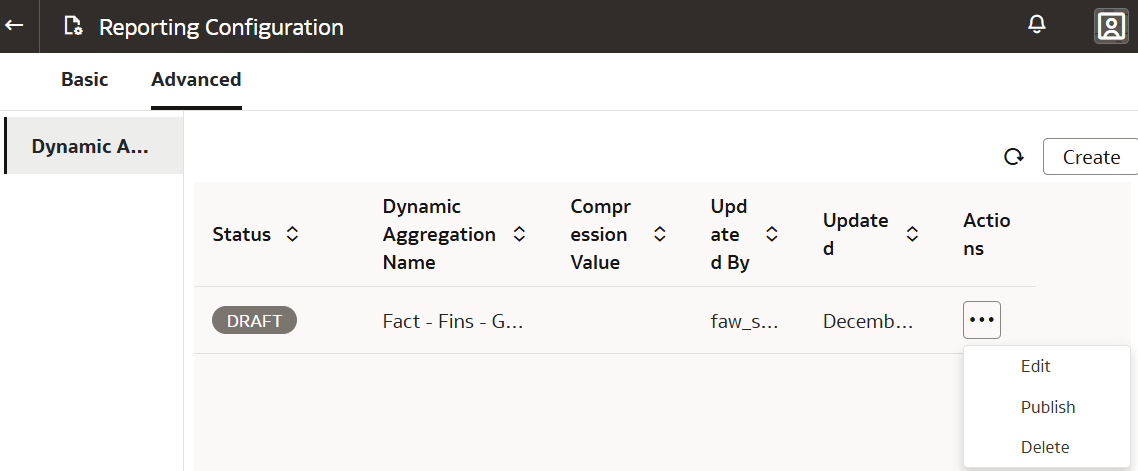
- On the Reporting Configuration page, under the Advanced tab, select
Dynamic Aggregation and then click
Create.

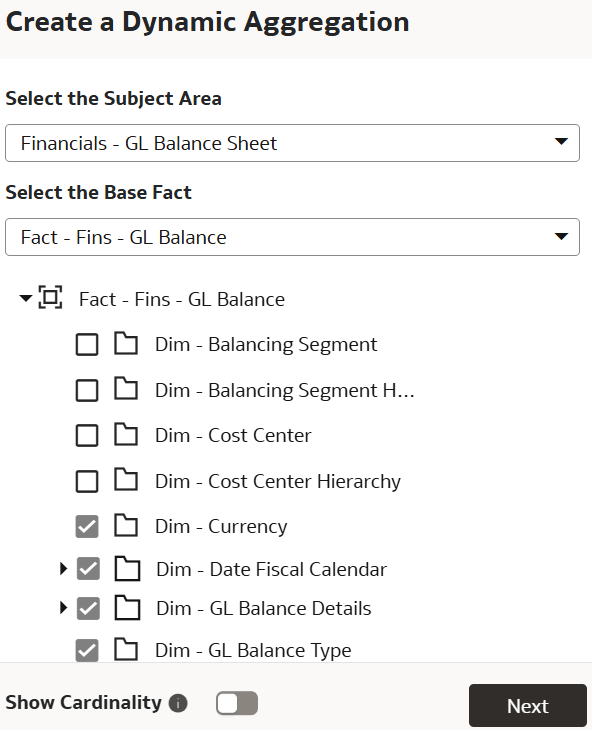
- In Create a Dynamic Aggregation, select the subject area, base fact, enable the
Show Cardinality toggle to view the cardinality of
each dimension with respect to the fact, and then the applicable
dimensions.The cardinality value enables you to decide whether to select the dimension or not.
- In the Dynamic Aggregation section under the Advanced tab on the Reporting
Configurations page,click the Actions option for your aggregate base fact, and
then select Publish to complete the dynamic aggregation
configuration.