Implement Custom Security
Beyond the prebuilt security functionality, you may want to implement additional data security rules tailored to your organization’s requirements.
For example, you can enable Legal Entity (LE)-based data security for the AP Overview subject area. You can ensure that users assigned to a group can access only the data for the entities explicitly assigned to them, while preserving the existing prebuilt security controls by configuring custom row-level data security. You can create custom data security application roles, define security contexts, security assignments, and perform validations using an Oracle Analytics Cloud report.
Complete these steps to implement custom security:
- Create new data security Application role. Sign in to Oracle Fusion Data Intelligence Administrator console, click Security, then Application Role. Click New Application Role. You need to login as a user who is having the "FAW security administrator group" assignment.
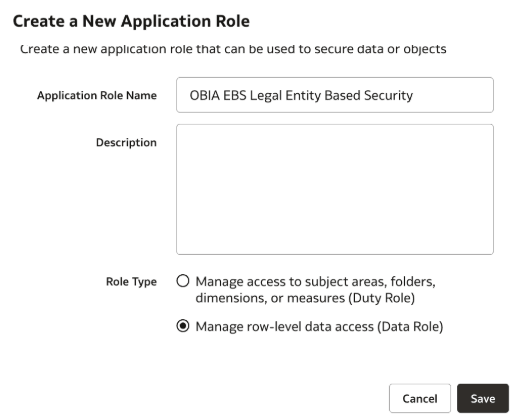
- Click Assign Groups under the Application Roles tab and add this data security application role to Group - "OBIA EBS Account Payables Manager" .
- Define the security context as follows:
- Navigate to the Application Roles tab.
- Search for the newly created data security application role "OBIA EBS Account Payables Manager".
- Go to Security Configurations.
- Set the following:
- Security Context Name: EBS AP LE Custom Security
- Attributes Driving Security Name/Description Column: OBIA EBS Financials - AP Overview
- Functional Group: EBS AP LE Security
- Objects to Secure: Fact - Fins - AP Transaction, Fact - Fins - AP Balance
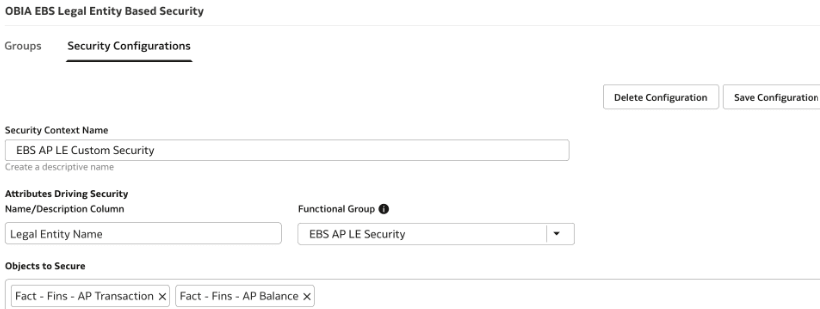
- Click Save Configuration.
- Assign the security assignments as follows:
- Navigate to Security and click Security Assignments.
- Assign the 2 legal entities to the applicable user.
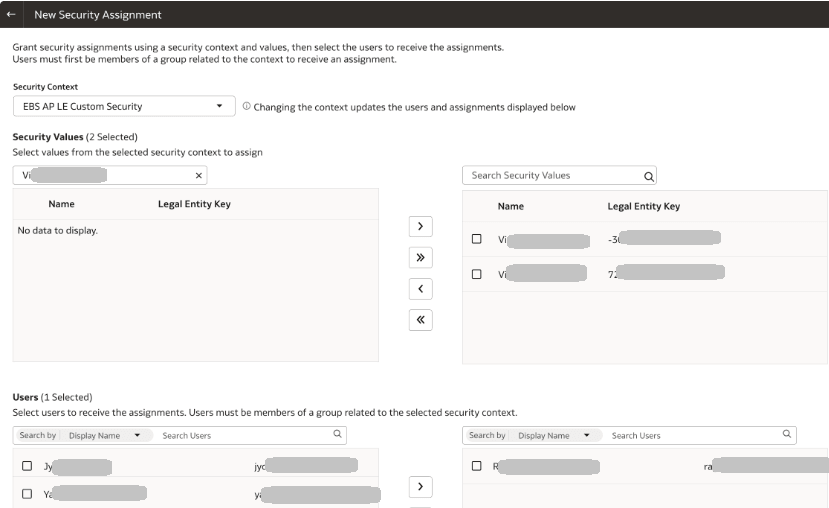
- Click Add to Cart and then View Cart.
- Notice the assignments on the next page and click Apply Assignments.
- Navigate to the Users tab and check the security configurations to confirm if assignments are reflecting as expected.
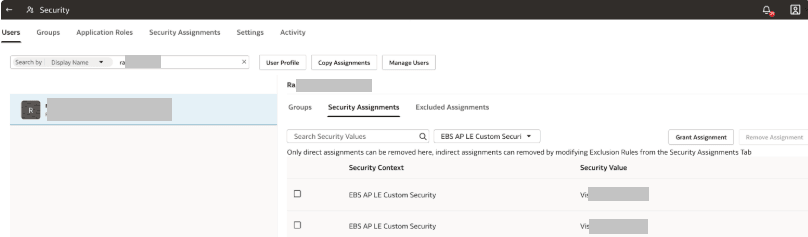
- After assigning the security assignments, wait for sometime for the changes to reflect.
- Validate if the custom security is getting applied by creating a sample report as follows:
- Sign in to Oracle Analytics Cloud associated with your Oracle Fusion Data Intelligence instance as the user who was assigned the security assignments.
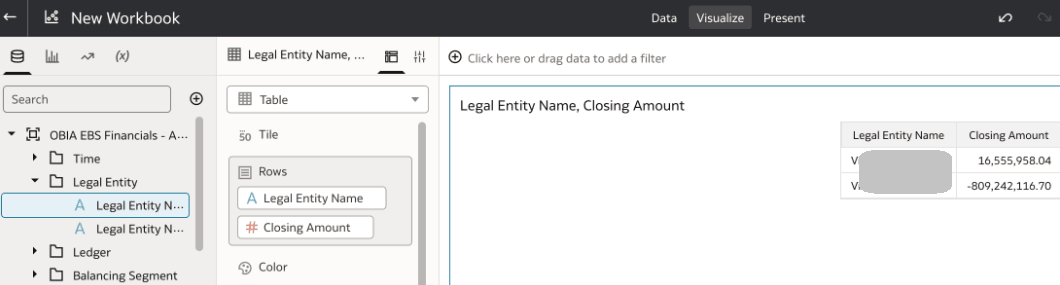
- Create a report using the OBIA EBS - AP Balance subject area. Add Legal Entity and Closing Amount columns.
- Notice that the Oracle Analytics Cloud report displays data only for the 2 legal entities that are assigned to the signed in user.
- Capture the session log file related to the report and observe the custom security related filters appearing in the report.
WITH
SAWITH0 AS (select T826726.ORG_NAME as c2,
     T827074.ROW_WID as c3,
     T826658.ROW_WID as c5,
     sum(case  when T826705.GROUP_ACCOUNT_NUM = 'AP' then T826683.BALANCE_LOC_AMT * -1 end ) as c6
from
     OAX_USER.DW_EB_X_EBS_COMMON_W_INT_ORG_D T827074 /* Dim_W_INT_ORG_D_LegalEntity */  left outer join OAX$OAC.SEC_SECURE_CUSTOM_MEMBER_USER T901004 /* SEC_SECURE_CUSTOM_MEMBER_USER_1887a12d-4e04-4191-af77-c75b2e0e1ad7_Dim_W_INT_ORG_D_LegalEntity */  On T901004.SEC_OBJ_CODE = '1887a12d-4e04-4191-af77-c75b2e0e1ad7' and T901004.USER_ID = '<applicable user>' and T901004.SEC_OBJ_KEY_1 = cast(T827074.ROW_WID as  VARCHAR ( 255 ) ),
     (SELECT
  DATASOURCE_NUM_ID,
  INTEGRATION_ID,
  ORG_DESCR,
  ORG_NAME,
  LANGUAGE_CODE

FROM
  DW_EB_X_EBS_COMMON_W_INT_ORG_D_TL

WHERE
  LANGUAGE_CODE = 'US') T826726,
     OAX_USER.DW_EB_X_EBS_COMMON_W_DAY_D T826658 /* Dim_W_DAY_D_Common */ ,
     OAX_USER.DW_EB_X_EBS_AP_W_AP_BALANCE_ENT_F T826683 /* Fact_W_AP_BALANCE_ENT_F */ ,
     OAX_USER.DW_EB_X_EBS_COMMON_W_GL_ACCOUNT_D T826705 /* Dim_W_GL_ACCOUNT_D */
where  ( T826658.ROW_WID = T826683.BALANCE_DT_WID and T826726.INTEGRATION_ID = T827074.INTEGRATION_ID and T826683.COMPANY_ORG_WID = T827074.SCD1_WID and T826683.GL_ACCOUNT_WID = T826705.ROW_WID and T826726.DATASOURCE_NUM_ID = T827074.DATASOURCE_NUM_ID and T827074.CURRENT_FLG = 'Y' and T901004.SEC_OBJ_CODE = '1887a12d-4e04-4191-af77-c75b2e0e1ad7' and (T827074.COMPANY_FLG in ('U', 'Y')) )
group by T826658.ROW_WID, T826726.ORG_NAME, T827074.ROW_WID),
SAWITH1 AS (select D1.c2 as c2,
     D1.c3 as c3,
     LAST_VALUE(D1.c6 IGNORE NULLS) OVER (PARTITION BY D1.c3, D1.c5 ORDER BY D1.c3 NULLS FIRST, D1.c5 NULLS FIRST ROWS BETWEEN UNBOUNDED PRECEDING AND UNBOUNDED FOLLOWING) as c4,
     D1.c5 as c5
from
     SAWITH0 D1),
SAWITH2 AS (select distinct LAST_VALUE(D1.c4 IGNORE NULLS) OVER (PARTITION BY D1.c3 ORDER BY D1.c3 NULLS FIRST, D1.c5 NULLS FIRST ROWS BETWEEN UNBOUNDED PRECEDING AND UNBOUNDED FOLLOWING) as c1,
     D1.c2 as c2,
     D1.c3 as c3
from
     SAWITH1 D1)
select D1.c1 as c1, D1.c2 as c2, D1.c3 as c3, D1.c4 as c4 from ( select 0 as c1,
     D1.c2 as c2,
     D1.c1 as c3,
     D1.c3 as c4
from
     SAWITH2 D1
order by c2 ) D1 where rownum <= 500001