Create an Authority Matrix
Set up rules and conditions to return a set of users for assignment who have sufficient job level assignments and spending limits to act on approvals.
You can think of routing patterns as an alias. Changes made to a pattern are reflected wherever they’re used.
-
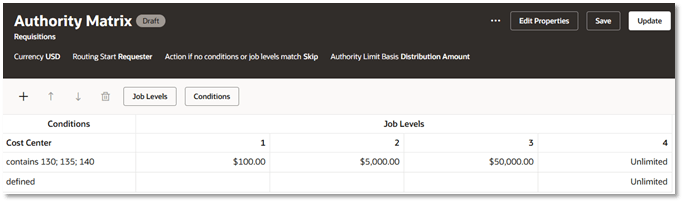
Add an authority matrix and set the properties, including:
Property Description Routing Start Beginning user type (for example, Requester) and job level of the approver in the matrix. Action if no conditions on job levels match This determines an outcome if no rules are met. You can raise an error, skip the assignment, reject the task, or automatically approve the step. Authority Limit Basis For a requisition, there are two amount fields for distribution. Choose the basis you want to use. Distribution Amount accounts for percentage distributions by different charge accounts. Distribution Approval Amount accounts for taxes, shipping, VAT, and other miscellaneous charges that should be reflected in the approval routing. Authority Limit Calculation This determines how the distribution amount for the approval is calculated, based on all distribution amounts or only those meeting the conditions in an associated step. -
Add the first condition.
- Click Add Condition to add condition attributes.
- Select the Condition Details, either an attribute or a named condition.
- Set the number of levels you want to support in the matrix. For example, you could have approvals at different job levels, skipping some.
- Add one or more rows to create the matrix.
- After you’ve added rows to your approval matrix, click in their condition attribute cells and define the conditions for the actions you’ve set.
- Enter spending limits for the job levels.