Send Time Optimization models
Applies to:B2B and B2C
The Send Time Optimization model helps identify the optimal time to engage with a customer maximizing the chances that campaigns are seen, opened, and acted upon.
What is Send Time Optimization model algorithm?
The model helps determine the optimal time to send campaigns to customers. These would be the times when the campaigns are most likely to be engaged with, thereby boosting open rates, reads and responses.
For example, the model would recommend a time to send a campaign email right before a customer typically checks their inbox. As a result, the message would appear at the top of the customer’s inbox, ensuring the email is most likely to be seen or opened.
The model, be default, looks at recurring campaigns (campaigns that last for more than a week) to determine the optimal send times.
Parameters of the model
To create and configure the model the following parameters must be defined:
-
Algorithm: Choose the Send Time Optimization algorithm in Unity.
-
Lookback window: You must also set a lookback window to define the period of historical analysis for the model
-
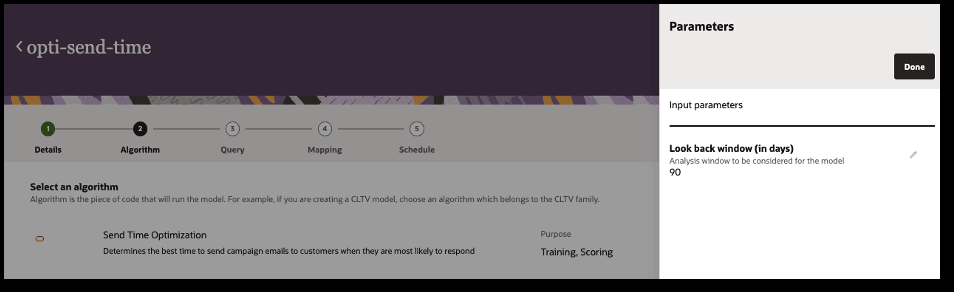
-
Queries: The queries you select generate the dataset used for both model training and scoring.
-
Inputs: Inputs are attributes from the Oracle Unity data model that the model uses during training and scoring.
-
Outputs: These are the data objects and attributes from the Unity data model that store the model's output values. You can customize the default output mappings if needed.
Model inputs
The Send Time Optimization model uses the following data. For the model to successfully run, check the sections: key input considerations, key data guidelines and best practices.
| Attribute from Unity data object | Attribute name in the query | Unity Data object | Description of the attribute | Expected Data Type | Must have? |
| ID | ID | MasterCustomer/Customer | Unique identifier for the Customer object | String | Yes |
| SourceID | SourceID | Customer | Unique Identifier for the source | String | Yes |
| SourceEventID | SourceEventID | Event | Unique identifier for the Event object | String | Yes |
| Medium | Medium | Event | Channel/ Medium of the event | String | Yes |
| Type | Type | Event | Customer engagement event like Click/ Open, etc. | String | Yes |
| EventTS | EventTS | Event | Date and time when the event occurred/ was captured | Timestamp | Yes |
| MarketingProgramID/ CampaignID | CampaignID | MarketingProgram/ Campaign | Unique identifier for the Campaign | String | Yes |
| Type | Campaign_Type | MarketingProgram | Type of the Marketing Program | String | |
| Medium | Campaign_Medium | MarketingProgram | The channel on which the Marketing Program was executed | String | |
| StartDate | StartDate | MarketingProgram | The date on which the Marketing Program began | Timestamp | Yes |
| EndDate | EndDate | MarketingProgram | The date on which the Marketing Program ended | Timestamp | Yes |
| Source | Source | MarketingProgram | Marketing Program source | String |
Key considerations on model inputs
-
Data schema checks: If an attribute is unavailable, assign a constant default value across all records. This allows the model to validate the input schema. This will not impact the model outcomes as the attribute will be excluded during feature importance analysis due to lack of data variance.
-
Event Medium values : The ‘Medium’ attribute in ‘Event’ table must contain the value of ‘email’
-
To run the model for a non-email channel, simply alias the medium values to ‘email’ in the data query. This enables the model to execute and generate recommendations for the non-email channel
-
-
Event Type values: The ‘Type’ attribute in ‘Event’ table must contain the values of ‘open’
-
To run the model with a non-open events, simply alias the desired type values to ‘open’ in the data query.
-
-
Schema consistency: Ensure that the attributes used in the query exactly match the specified 'Attribute name in the query' (in the above table) to avoid schema mismatches during model execution.
-
Non-mandatory attributes: These attributes, when available, can enhance the model’s learning and improve its predictive performance. However, if they are missing, the model will still leverage other available attributes to make predictions.
Key input data guidelines
-
Data requirements:
-
It is recommended to provide at least 50,000 data records for model training. However, it is important to bring as much data as possible to build a robust model
-
It is recommended to keep the dataset under 10M records (soft limit). This limit can vary for every model, but maintain a manageable size helps ensure efficient model performance.
-
Best practices
-
Use case first approach: Begin with a specific use case to determine the data required for solving the problem effectively.
-
Review model data requirements with both business and data teams to ensure alignment
-
-
Contextual parameters: Choose model parameters (such as lookback window) based on the business/ use case context.
-
Query validation: Test both the training and scoring queries to validate that they return data and inspect sample records resulting from the query
Model outputs
Output values will be stored in the CustomerSTO data object.
-
The model identifies the optimal hour for each weekday, provided there is sufficient data to support the recommendation.
-
For cases where the data is insufficient for a specific weekday, the model recommends the 'STOBestHourInDay' as a fallback recommendation
-
The model also determines the ‘STOBestDayInWeek’ helping you with the most effective day to send your campaigns
| Attribute ID | Attribute Name | Attribute Description | Data type |
| SourceCustomerSTOID | Source CustomerSTO ID | This attribute contains the unique ID for the object. | STRING |
| MarketingProgramID | Marketing Program ID | This attribute contains the Marketing Program ID | STRING |
| STOBestDayInWeek | STO Best Day In Week | This attribute represents the provides best send day for a customer (0 - any day, 1 - Sunday, 2 -Monday, and so on till 7 - Saturday) | INT |
| STOBestHourInDay | STO Best Hour In Day | This attribute represents the value denoting the best hour of the day 0 to 23; 0 - hour starting 12AM, 23 - hour starting 11PM. | INT |
| STOBestDayInWeekFull | STO Best Day In Week Full | This attribute represents the provides best send day for a customer (expanded version of 'STO Best Day in Week'). | STRING |
| SundayBestHour | Sunday Best Hour | This attribute represents the value denoting the best hour of Sunday (0 to 23; 0 - hour starting 12AM, 23 - hour starting 11PM). | INT |
| MondayBestHour | Monday Best Hour | This attribute represents the value denoting the best hour of Monday (0 to 23; 0 - hour starting 12AM, 23 - hour starting 11PM). | INT |
| TuesdayBestHour | Tuesday Best Hour | This attribute represents the value denoting the best hour of Tuesday (0 to 23; 0 - hour starting 12AM, 23 - hour starting 11PM). | INT |
| WednesdayBestHour | Wednesday Best Hour | This attribute represents the value denoting the best hour of Wednesday (0 to 23; 0 - hour starting 12AM, 23 - hour starting 11PM). | INT |
| ThursdayBestHour | Thursday Best Hour | This attribute represents the value denoting the best hour of Thursday (0 to 23; 0 - hour starting 12AM, 23 - hour starting 11PM). | INT |
| FridayBestHour | Friday Best Hour | This attribute represents the value denoting the best hour of Friday (0 to 23; 0 - hour starting 12AM, 23 - hour starting 11PM). | INT |
| SaturdayBestHour | Saturday Best Hour | This attribute represents the value denoting the best hour of Saturday (0 to 23; 0 - hour starting 12AM, 23 - hour starting 11PM). | INT |
| MasterCustomerID | Master Customer ID | This attribute contains the foreign key to the MasterCustomerID. | STRING |
| SourceMasterCustomerID | Source Master Customer ID | This attribute contains the original form of the MasterCustomer ID from the source data system. | STRING |