Churn Propensity models
Applies to: B2C
The Churn Propensity algorithm helps marketers proactively identify customers who are at a high risk of disengaging or churning. This will help marketers target and engage at-risk customers with timely & personalized campaigns.
The Churn Propensity model explained
The Churn Propensity model helps marketers proactively identify potential churn in customers. By analyzing customers’ historical transactions, the model assigns a churn likelihood score to each customer. This insight allows marketers to engage the at-risk customers with retention and re-engagement campaigns.
Parameters of the model
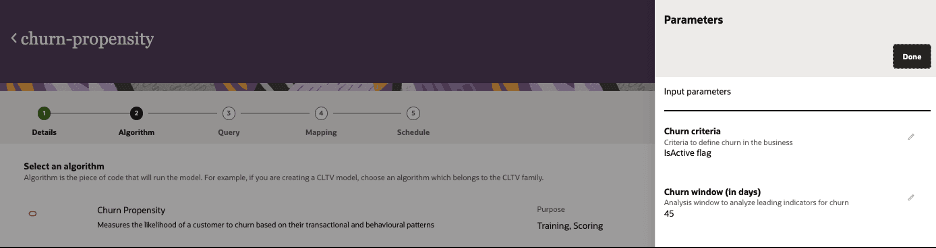
When creating the model, you will need to define the following parameters for the model:
-
Algorithm: Choose the Churn Propensity algorithm in Unity.
-
Churn Criteria:Select the labelling criteria the algorithm will use to define churn in the model. This will help the model will learning from historical data.
-
IsActive flag: Choose this option if you are deciding the churn criteria prior to the model run as part of the ingest data. Make sure the ‘IsActive’ attribute (True = non-churn customer, False = churn customer) is populated with the right labels.
-
Custom - Zero orders: The algorithm will determine if customers are churned based on the Churn Window selection. For example, if you select a Churn Window of 30 days and a customer has no orders in the past 30 days, then the algorithm will tag the customer as churned.
-
-
Churn Window: You must choose the churn analysis window (number of days to analyze historical data)

-
-
Queries: The queries you select generate the dataset used for both model training and scoring..
-
Inputs: Inputs are attributes from the Oracle Unity data model that the model uses during training and scoring.
-
Outputs: These are the data objects and attributes from the Unity data model that store the model's output values. You can customize the default output mappings if needed.
Model inputs
The Churn propensity model uses the following data. For the model to successfully run, check the sections: key input considerations, key data guidelines and best practices.
| Attribute from Unity data object | Attribute name in the query | Unity Data object | Description of the attribute | Expected Data Type | Must have? |
| ID | ID | MasterCustomer | MasterCustomer identifier | String | Yes |
| SourceID | SourceID | Customer | SourceId of the customer | String | Yes |
| Age | Age | MasterCustomer | Helps assess impact of age on churn | Integer | |
| Gender | Gender | MasterCustomer | Helps assess impact of gender on churn | Strin | |
| IsActive | IsActive | MasterCustomer | Indicates if a customer has churned or not (0/1) | Boolean |
Yes (if ChurnWindow = ‘IsActive’) |
| ZipCode | ZipCode | MasterCustomer | Helps assess regional differences in churn | String | |
| Status | Status | Order | Status of the order placed by the customer | String | |
| Total | Total | Order | Total price paid by the customer | String | Yes |
| ProductID | ProductID | OrderItem | Product identifier | String | Yes |
| OrderEntryTS | OrderEntryTS | OrderItem | Date the order was placed/ fulfilled | Timestamp | Yes |
Key considerations on model inputs
-
Data schema checks: If an attribute is unavailable, assign a constant default value across all records. This allows the model to validate the input schema. This will not impact the model outcomes as the attribute will be excluded during feature importance analysis due to lack of data variance.
-
Churn label: Ensure the IsActive attribute is populated if you select IsActive flag in the Churn Criteria parameter.
-
Model extensibility: The model can be run to predict churn at a product level as well as at an overall/ product category level. You can modify the data query to keep only the relevant data required at the product or product category or overall level depending on the use case.
-
Schema consistency: Ensure that the attributes used in the query exactly match the specified 'Attribute name in the query' (in the above table) to avoid schema mismatches during model execution.
-
Non-mandatory attributes: These attributes, when available, can enhance the model’s learning and improve its predictive performance. However, if they are missing, the model will still leverage other available attributes to make predictions.
Key input data guidelines
-
Label requirements: Ensure the model data contains at least 500 positive signals (churns) and 500 negative signals (non-churns) for every product
-
Data requirements:
-
It is recommended to provide at least 50,000 data records for model training. However, it is important to bring as much data as possible to build a robust model.
-
It is recommended to keep the dataset under 10M records (soft limit). This limit can vary for every model, but maintain a manageable size helps ensure efficient model performance.
-
Best practices
-
Use case first approach: Begin with a specific use case to determine the data required for solving the problem effectively.
-
Review model data requirements with both business and data teams to ensure alignment .
-
-
Contextual parameters: Choose model parameters (such as lookback window) based on the business/ use case context.
-
Query validation: Test both the training and scoring queries to validate that they return data and inspect sample records resulting from the query
Model outputs
Output values will be stored in the CustomerChurn or Customer_Churn data object. You can review the churn score values for each customer in the ChurnScore attribute.
| Attribute ID | Attribute Name | Attribute Description | Data type |
| SourceCustomerChurnID | Source CustomerChurn ID | This attribute contains the unique ID for the object. | STRING |
| ChurnRisk | Churn Risk | This attribute contains the churn risk classification for the customer | STRING |
| ProductID | Product ID | This attribute contains the foreign key to the ProductID. | STRING |
| SourceProductID | Source Product ID | This attribute contains the original form of the Product ID from the source data system. | STRING |
| ChurnScore | Churn Score | This attribute contains the predicted churn score for the customer. | FLOAT |
| MasterCustomerID | Master Customer ID | This attribute contains the foreign key to the MasterCustomerID. | STRING |
| SourceMasterCustomerID | Source Master Customer ID | This attribute contains the original form of the MasterCustomer ID from the source data system. | STRING |
The ChurnRisk attribute will generate one of the following values based on the churn score.
| Churn score | Churn risk |
| 0 - 0.2 | Very Low |
| 0.2 – 0.4 | Low |
| 0.4 – 0.6 | Medium |
| 0.6 – 0.8 | High |
| 0.8 – 1.0 | Very High |