Working with Contextual Properties
Contextual properties enable different properties to be displayed for a node based on its current context.
About Contextual Properties
Contextual properties enable you to display different sets of properties for a node based on the value of a designated controlling property. This allows a single node type to support multiple business scenarios without requiring separate node types or duplicate properties.
A context is defined at the node type level and consists of:
- A controlling property, which determines the active context.
- One or more context values, which represent the possible values of the controlling property.
- A set of contextual properties associated with each context value.
When you select a value for the controlling property, Oracle Fusion Cloud Enterprise Data Management displays only the contextual properties assigned to that value. Contextual properties that are not applicable to the selected value are hidden and are excluded from validation, required property checks, and most request processing. Existing values for hidden properties are retained, but they are not returned or validated until the applicable context becomes active again.
Contextual properties are useful when different business scenarios require different
information for the same business object. Rather than displaying properties that
aren't relevant for a given property value (for example, if the value of an
Education Level property is High School, the property
Degree Type isn't relevant), you can configure the appropriate properties
to appear only when they are relevant.
Note:
A node type can have multiple contexts, but the contexts must use different controlling properties and a contextual property can be associated with only one context within a node type.Contextual Property Examples
Example: Displaying different properties for different context values
A retail organization tracks information for different types of stores. A Store Type property is configured as the controlling property with the following context values:
| Context Values | Contextual Properties |
|---|---|
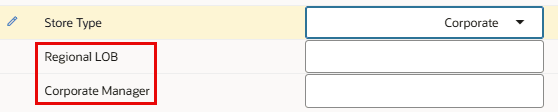
| Corporate | Regional LOB, Corporate Manager |
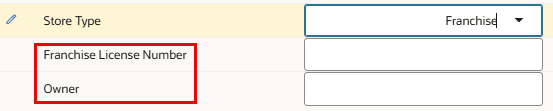
| Franchise | Franchise License Number, Owner |
When you select Corporate as the value for the Store Type property, the viewpoint displays only the Regional LOB and Corporate Manager properties:
When Franchise is selected, those properties are hidden and Franchise License Number and Owner are displayed instead:
Because only the properties for the active context are displayed, users are presented with a simpler property sheet that contains only the information required for the selected store type.
Example: Displaying properties for only one context value
A chart of accounts includes an Intercompany? property that identifies whether an account is used for intercompany transactions. The Intercompany? property is configured as the context control property and has two context values:
| Context Value | Contextual Properties |
|---|---|
| Yes | Intercompany Entity, Elimination Rule, Partner Company |
| No | None |
When you select Yes, the viewpoint displays the additional properties required to configure the account for intercompany processing.
When you select No, no contextual properties are displayed because no additional information is required for non-intercompany accounts.
This configuration allows a single account type to support both intercompany and non-intercompany accounts while presenting users with only the properties that are relevant to the selected value.
See Configuring Contextual Properties for information on setting up contextual properties.