Downloading EPM Assistants
You can download EPM Assistants from the Oracle Fusion Cloud Enterprise Performance Management environment. EPM Assistants include preconfigured JSON definitions that you import into AI Agent Studio to create AI agents that interact with Cloud EPM REST APIs.
Prerequisites
The EPM Assistants option is available for the following business processes only when AI is enabled. For instructions on enabling AI, see the appropriate administration guide:
- Enabling AI in Enterprise Profitability and Cost Management in Administering and Working with Enterprise Profitability and Cost Management
- Enabling AI in FreeForm in Administering FreeForm
- Enabling AI in Planning in Administering Planning
Downloading EPM Assistants
To download EPM Assistants:
- Sign in to your Cloud EPM environment as a Service Administrator.
- On the Home page, click your user name in the upper-right corner, and then
select Downloads.
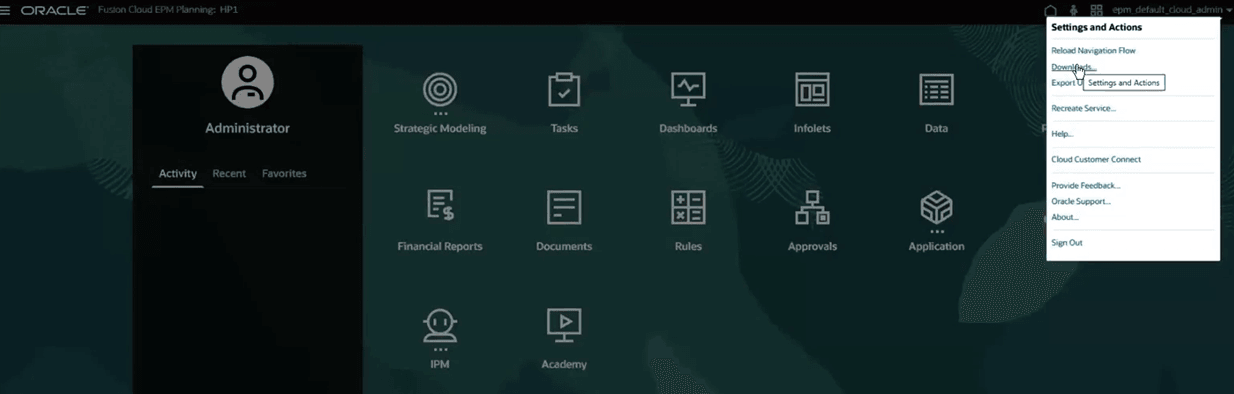
- On the Downloads page, locate EPM Assistants in the list of available downloads.
- Click Download.
- Extract the downloaded ZIP file to obtain the JSON files.
Artifact Details
The downloaded ZIP file follows a naming convention that identifies the Cloud EPM application and service name.
Format:
EPM_AI_Agent_Artifacts-<application_name>-<alphanumericServiceName>.zip
Examples:
- If the application name is Vision and the service name is epm1,
the file name
is:
EPM_AI_Agent_Artifacts-VISION-EPM1.zip - If the application name is Plan and the service name is planning,
the file name
is:
EPM_AI_Agent_Artifacts-PLAN-PLANNING.zip
Note:
The application name and service name in the file name help you identify the source and ensure uniqueness. This prevents overwriting files imported into AI Agent Studio from different Cloud EPM environments.- Agent teams
- Agents
- Tools
- Business objects
- Business object functions
These elements define how AI agents interact with Cloud EPM applications.
Best Practice
- Create a copy of the downloaded files before making changes. Do not modify the original files directly.
- If you modify the original files and later reimport them, your changes may be overwritten.
- Customize EPM Assistants to fit your specific use cases. The delivered templates provide a starting point and may not cover all scenarios.