Drill through to Oracle Autonomous Database Source Without Using the EPM Integration Agent
When integrating to an Oracle Autonomous Database data source, you can drill down to the source to view the details associated with account balance data loaded to the Oracle Fusion Cloud Enterprise Performance Management. You must execute a SQL query in the source database and display the results in a pop-up window inside Data Integration.
Creating a Query for Drill Through
To create a query for the drill through:
-
On the Data Integration home page, from the Actions menu, click Setup and then click Query.
-
On the Query page, click

-
From the Create Query page, in Query Name, specify the name of the query to query the data from the source system.
-
In Query String, specify the SQL statement used to extract the data based on the header row in the file.
You can use an alias for a column name in the SQL query to the dimension name.
When specifying the string for a header row value and the string is mixed case, enclose the string in double quotation marks. When a string with mixed case characters is not enclosed within double quotation marks, it is resolved in uppercase.
The query can include filter conditions. The bind variable for the filter condition must be enclosed inside ~~ characters.
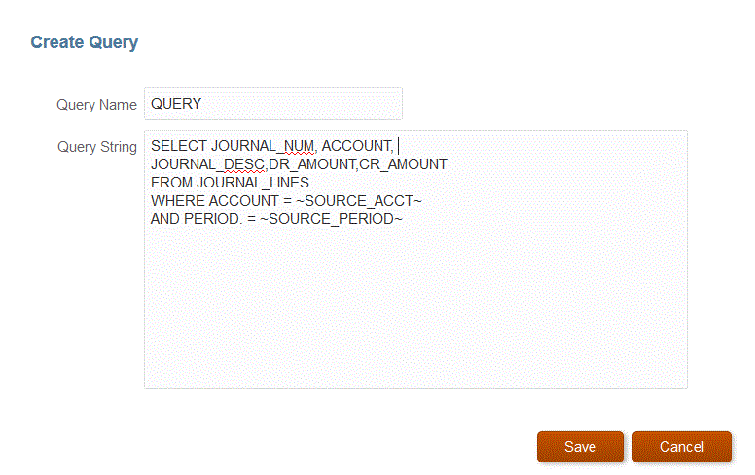
-
Click Save.
-
From the Data Integration home page, click
 to the right of the integration for which you want to add a drill
through, and then select Map Dimensions.
to the right of the integration for which you want to add a drill
through, and then select Map Dimensions.
-
On the Map Dimension page, in Drill URL, click the
 drill pen icon.
For more information about the Map Dimension page, see Mapping Dimensions.
-
On the Edit Drill URL page, specify the #oadb tag and then specify parameters for the drill through URL.
For example, using the query shown in step 4, enter:
#oadb?QUERY=Source Drill
                            Query&SOURCE_ACCOUNT=$ACCOUNT$&SOURCE_PERIOD=$ATTR1$
Where:
-
QUERY is the name of the query you defined in step 3
-
SOURCE_ACCOUNT is derived from the ACCOUNT column
-
SOURCE_PERIOD is derived from the ATTR1 column
-
-
Map the columns in the source column to the dimensions in the target application to which to drill through and click Save.
Viewing Oracle Autonomous Database Source Using Drill Through
To view the Oracle Autonomous Database source using drill through:
- On the Data Integration page, click (Action icon) and then click Workbench.
The integration details window is displayed.
- Click any of the links in the Source Amount column and
then click Drill Through Source.
The details of the source amount is displayed.