Creating a New Criteria

You create a new criteria to control the display of rows as per your requirement.

To create a new criteria:

  1. From the Home page, click Reports.
  2. Click New (+) to create a New Report. An Untitled Report dialog appears.
  3. From the blank report, click New Table Icon.
  4. From the report body, right-click and select Add Report Content, and then select Table.
  5. Click Setup Table.
  6. In Select Source, select a schema for the table, and then click OK. Next, define the desired column attribute selections.
  7. Click the filter iconicon, and then select Filter Criteria or Aggregation Criteria. Based on your criteria selection, click edit icon.
  8. In Edit Filter Criteria or Edit Aggregation Criteria section, you can select the attributes and values that will be used to filter data and specify multiple groups from a suggested choice list.

    For each selection, you must specify the following:

    • Conjunction: Select And or Or. These state how this group relate to prior sibling groups. This field is enabled only if the selected node is not the first child of its parent node.
    • Attribute: An attribute is a field or value that a filter will be comparing to a value for inclusion in the result set of a filter. However, for the case of a filter, an attribute denotes more than the list of user-defined attributes.
    • Operator: States what kind of evaluation to perform against the attribute. For example, Starts With, Ends With, In, Equals, Not Equals, Greater Than, Less Than, Greater Than or Equal To, Between, Is Null, Is Not Null, Matches, and Not Matches.
    • Value: Specifies what values to compare the attribute against. The type of attribute determines what input field is available.
  9. (Optional) You can add multiple filter components to a list, such as Add Child add child, Add Grouping as Child add grouping as sibling, and Add Sibling add sibling icon .
  10. Click OK. The criteria details are updated.

For the following table designed that goes against the Supplemental Data Manager schema, the following Criteria has been defined:
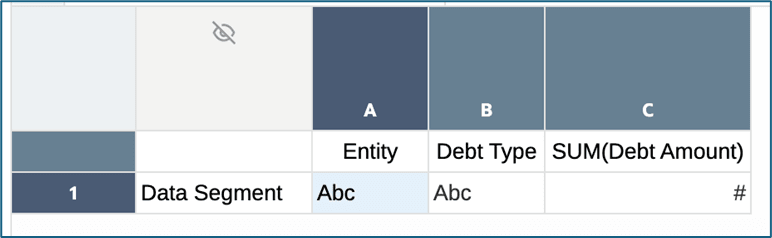

example of creating a criteria

Here is the defined Filter and Aggregation Criteria:
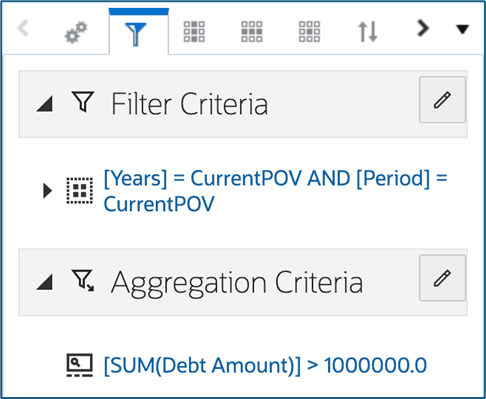

Filter and Aggregation Criteria

Let’s look at each Criteria definition in more detail:
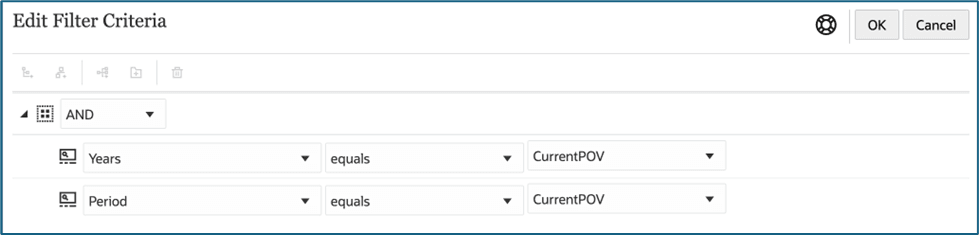

Edit Filter Criteria

The Filter Criteria definition has both Years and Period equal to the CurrentPOV. This exposes POV selections for these two attributes when the table is run for users to select.
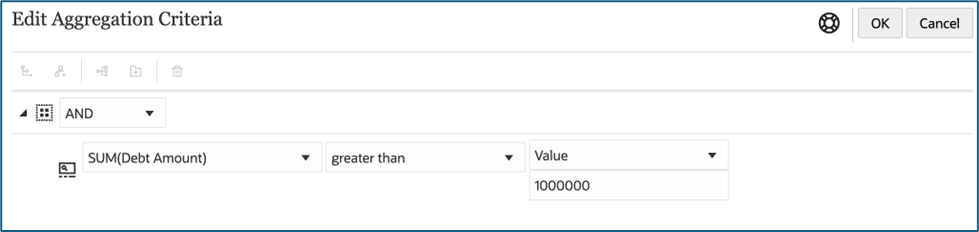

Edit Aggregation Criteria

The Aggregation Criteria filters the table if the SUM(Debt Amount) is greater than 1,000,000. SUM(Debt Amount) is in column C of the table definition.

Here is the resulting table preview. Note that the POV for Years and Period filter the table content, and the SUM(Debt Amount) displays only values above 1,000,000.
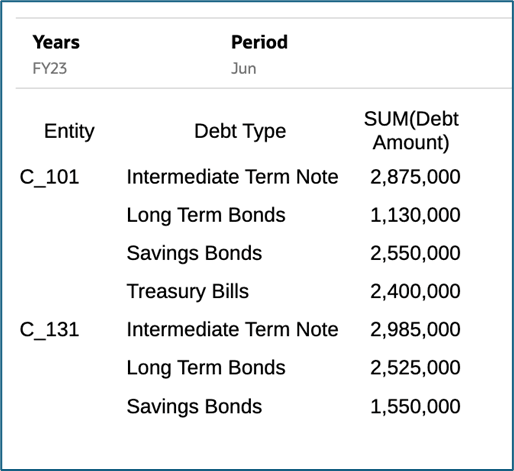
Example of years and period Filter