Using PCM Agent in the Waterfall Setup Tab
PCM Agent is a guided natural language tool that uses Generative AI (GenAI) to assist with workflow tasks by executing confirmed modeling commands. See Using Profitability and Cost Management (PCM) Agent.
PCM Agent is embedded in the Designer Waterfall Setup tab. It provides a true converstional experience where you are able to interact naturally with the assistant within the current workflow.
You can use PCM Agent in the Waterfall Setup tab to perform tasks such as:
-
List rule sets
-
List rules
-
Enable/disable rules
-
Copy rules to a rule set
-
Copy rules to a model
-
Add members
-
Replace members
To open PCM agent in the Waterfall Setup tab:
-
Click
 at the top of the Waterfall Setup tab.
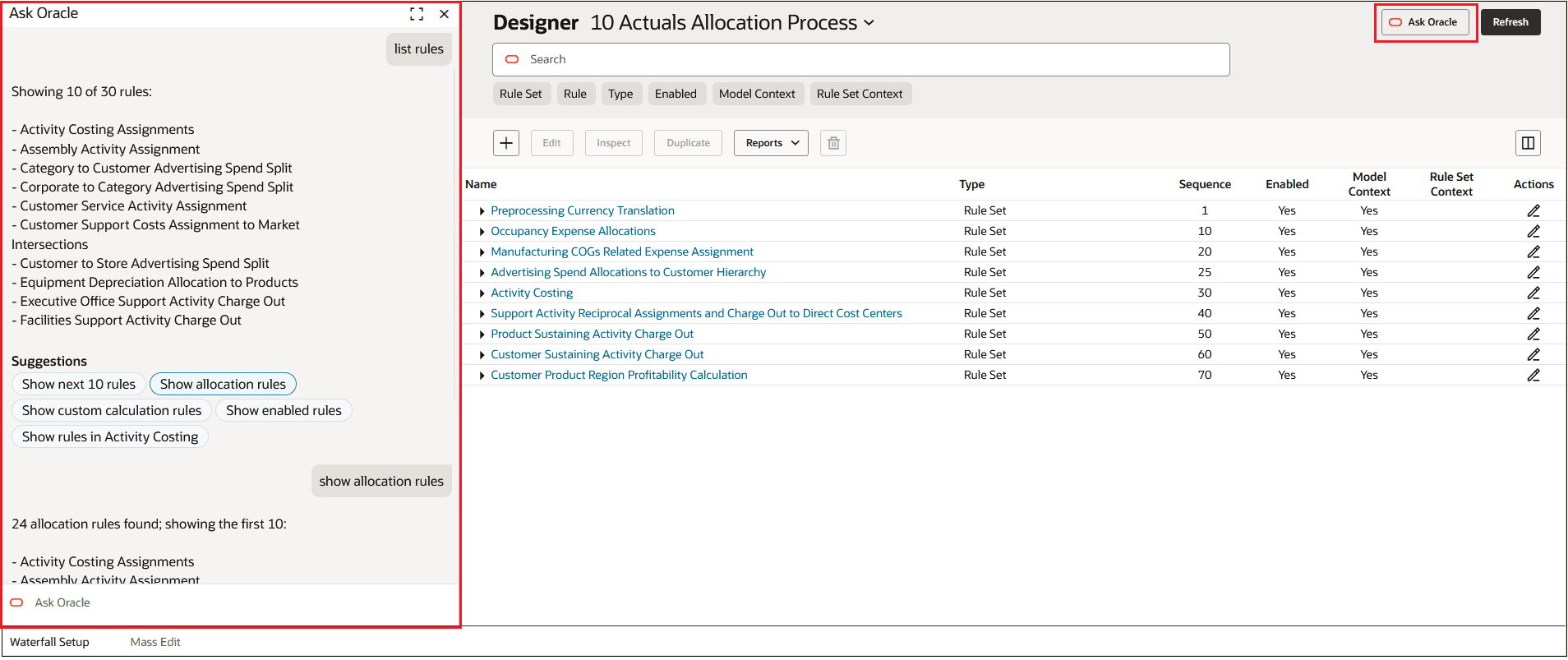
PCM Agent is displayed on the left side of the page.
-
Enter a prompt in the Ask Oracle area at the bottom of the page.
The PCM Agent assistant prompts you with the information required to complete a task.
As an example, assume you want to list all the rules in a model. To do this, would would
enter list rules in the Ask Oracle prompt. PCM
Agent would then give you suggestions to further refine rules such as "Show next 10
rules", "Show allocation rules", "Show custom calculation rules", or
"Show enabled rules". You could continue to refine the rules listed as
desired.
Figure 8-1 Sample Prompts to List Rules