Source Mappings for a Cloud EPM Source Type
Source Mappings can be defined when you need to add period mappings between Oracle Fusion Cloud Enterprise Performance Management business processes.
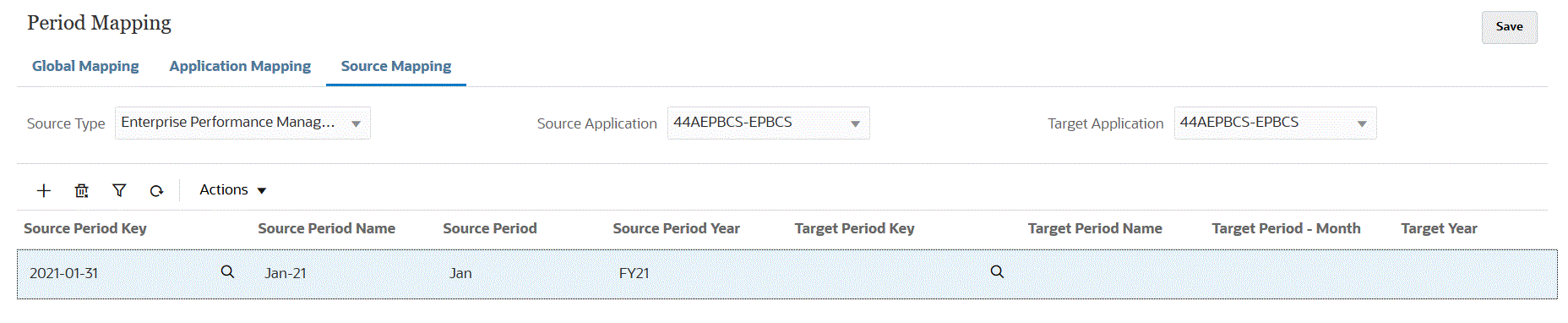
To create a source mapping for a Cloud EPM source type:
-
From the Data Integration home page, and then from the Actions menu, then from the Setup actions drop-down, select Period Mapping.
-
On the Period Mapping page, select the Source Mapping tab.
-
From the Source Type drop-down, select Enterprise Performance Management.
-
From Source Application, select the name of the source application from which to add a period mapping.
-
From Target Application, select the name of the target application to which to add the source period mapping.
- Click
 and then click Add Mapping.
-
In Source Period Key, click
 to open the Search and Select: Period Key window. Search and select
the last day of the month for the current fiscal year to be mapped from the
source system. The Source Period Name,
Source Period, and Source Period
Year are populated by default based on the selected
Source Period Key.
to open the Search and Select: Period Key window. Search and select
the last day of the month for the current fiscal year to be mapped from the
source system. The Source Period Name,
Source Period, and Source Period
Year are populated by default based on the selected
Source Period Key.
Note:
Period names cannot include spaces if used in a batch script. -
In Target Period Key, click
to open the Search and Select: Period Key window. This page lists
all the global mapping periods that are not used in the source mappings for
the source. Specify the last day of the month for the current fiscal year to
be mapped to the target system. The Target Period
Name, Target Period - Month, and
Target Year are populated by default based on the
selected Target Period Key.
- In Description, enter a description of the source period mapping.
- To delete a mapping, click the
 (Delete) icon.
-
Click Save.