Configure Forms for Offline Use in Plugins
You can enable offline access for forms opened through plugins by selecting organizations and user types during form setup. This extends caching capabilities beyond the traditional button or step-based configurations. Offline support ensures that forms remain accessible in low-connectivity environments. By proactively caching forms for selected users, mobile workers working in the field can continue data entry without disruption. This feature is particularly important for plugins, which do not rely on standard button-based caching.
To configure forms for offline access:
-
Go to Forms & Plugins >Add Form, or edit an existing form.
The Form page appears.
-
In the Cache Form for Organizations or User Types section, click Configure Offline Caching.
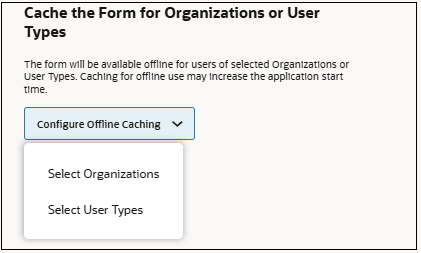
- Specify offline access:
- Click Select Organizations and choose the organizations that require offline access..
- Click Select Users and choose the specific user types that require offline access.
- Click Add.
Note: The application automatically caches the form on devices for matching mobile workers. If you do not select organizations or user types, the form uses the application’s default caching behavior.
To validate offline access-
After synchronization, simulate a disconnection to verify offline functionality.
-
For plugins, combine offline caching with online pre-filling to support hybrid workflows.
-
Limit offline caching to frequently used forms to optimize device storage.
-
Use targeted caching to ensure only relevant mobile workers receive offline access.