How Subledger Journal Entries are Created and Processed in Accounting Hub
The Create Accounting process uses the uploaded transaction data and accounting rules to create subledger journal entries. For example, a subledger journal entry rule set specifies that the customer name should appear in the description of a subledger journal entry line.
The customer name value is obtained from the customer name source data provided by the uploaded transaction data.
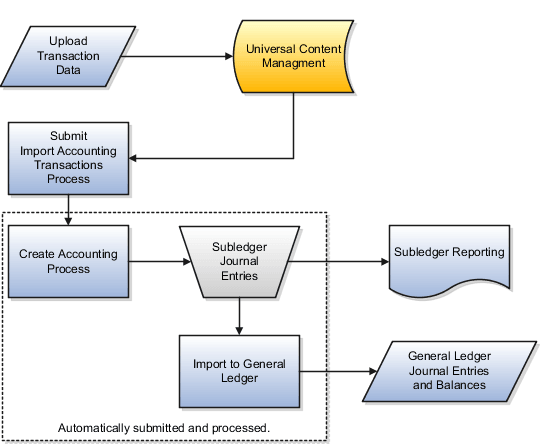
This figure illustrates the Create Accounting process.
How Subledger Journal Entries Are Created and Processed in Accounting Hub
-
The source system transactions are uploaded into Universal Content Management.
-
The transactions are then imported into Accounting Hub using the Import Accounting Transactions process.
-
The Create Accounting process is automatically submitted.
-
Subledger journal entry rule set definitions and sources from transaction data are applied to create subledger journal entries.
-
The subledger journal entries are summarized and imported to Oracle General Ledger.
Process Multiple Ledgers in Single Run
The Create Accounting for Data Set process can process all Accounting Hub transactions imported through a single data file, including transactions for multiple ledgers.
This reduces the need to submit and orchestrate separate accounting processes for each ledger.
Transfer Subledger Accounting Entries to General Ledger
After accounting entries are generated, they are summarized and transferred to General Ledger.
When you submit the Create Accounting process with the Transfer to General Ledger parameter set to Yes, accounting entries are transferred directly to General Ledger without launching the:
- Post Subledger Journal Entries process
- Journal Import process
If you submit the standalone Post Subledger Journal Entries process, accounting entries are transferred to General Ledger without launching the Journal Import process.
If an accounting entry references an invalid account with an alternate account defined, the alternate account is used while creating General Ledger journals.
If validation errors occur during General Ledger journal batch creation:
- Valid accounting entries are transferred to General Ledger.
- Invalid accounting entries aren't transferred.
Review transfer validation errors on the Manage Accounting Errors page.
Intelligent Queue Management
The system manages scheduled job queues and releases Create Accounting workloads based on available processing capacity.
Submission of the Create Accounting for Data Set process is put on hold until sufficient capacity is available for downstream accounting and posting processes.
Configure Processing Options
Configure multiple ledgers in a single process run and transfer Subledger Accounting entries to General Ledger for Accounting Hub applications:
- Navigate to Setup and Maintenance area.
- Open the Manage Standard Lookups task.
- Search for the ORA_ERP_CONTROLLED_CONFIG lookup type.
- Define the following Lookup Code under above Lookup Type:
- Lookup Code: XLA_34838399
- Enabled: <selected>
- Meaning: Multiledger Accounting
- Save the changes.
Configure direct transfer for Accounting Hub applications:
- Navigate to Setup and Maintenance area.
- Open the Manage Standard Lookups task.
- Search for the ORA_ERP_CONTROLLED_CONFIG lookup type.
- Define the following Lookup Code under above Lookup Type:
- Lookup Code: XLA_35065565
- Enabled: <selected>
- Meaning: Direct Transfer for Accounting Hub applications
- Save the changes.
- Navigate to Setup and Maintenance area.
- Select the Fusion Accounting Hub offering.
- Open the Accounting Transformation functional area.
- Open the Manage Subledger Accounting Lookups task.
- Search for the ORA_XLA_PROMOTIONAL_OPTIONS lookup type.
- Define the following Lookup Code under above Lookup Type:
- Lookup Code: XLA_PROMO_31776850_ON
- Reference Data Set: Common Set
- Enabled: <selected>
- Meaning: Direct Transfer
- Save the changes.
- Navigate to Setup and Maintenance area.
- Select the Fusion Accounting Hub offering.
- Open the Accounting Transformation functional area.
- Open the Manage Subledger Accounting Lookups task.
- Search for the ORA_XLA_PROMOTIONAL_OPTIONS lookup type.
- Define the following Lookup Code under above Lookup Type:
- Lookup Code: XLA_PROMO_32357094_ON
- Reference Data Set: Common Set
- Enabled: <selected>
- Meaning: Enable Intelligent Queue Management
- Save the changes.
Considerations
Keep these considerations in mind:
- It is recommended that you enable Process Multiple Ledgers in a Single Run.
- Intelligent Queue Management isn't engaged when Process Multiple Ledgers in a Single Run is enabled.
- Intelligent Queue Management manages Create Accounting workloads only when Process Multiple Ledgers in a Single Run isn't enabled.
- Direct transfer to General Ledger doesn't apply when:
- Online accounting is submitted from transaction pages.
- The Multiperiod Accounting process is submitted. In this case, the Journal Import process is skipped, but the Post Subledger Journal Entries process isn't skipped.
- Accounting is transferred outside Fusion General Ledger, such as Oracle EBS General Ledger or Oracle PeopleSoft General Ledger.
- If Transfer to General Ledger is set to Yes during Create Accounting submission, the processing unit size defined in the Create Accounting Processing Options section of the Subledger Accounting System Options page is used to transfer journals to General Ledger.
This can affect the number of journal batches generated. For example, if the Create Accounting Processing Unit Size is set to 1000 and the General Ledger Transfer Processing Unit Size is set to 2000, direct transfer can result in twice the number of journal batches when more than 2000 events are processed in a batch.
- If you use the Post Subledger Journal Entries process to transfer journals to General Ledger, the processing unit size defined in the Transfer to General Ledger Processing Options section of the Subledger Accounting System Options page is used.