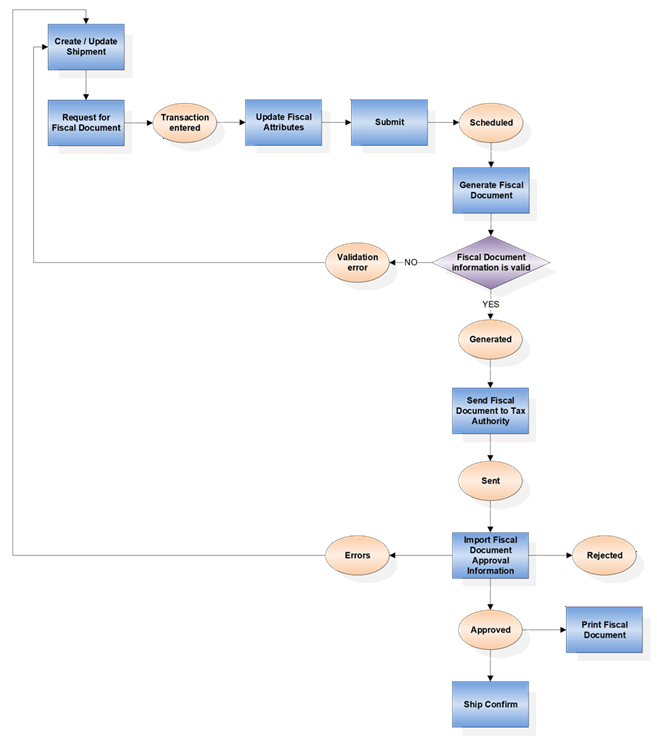
Process to Generate Fiscal Document for Sales Order Shipments
The process for generating the fiscal document and getting approval from the tax authority is similar to other fiscal document flows. After requesting the fiscal document from the shipment transaction, you can view the fiscal document status from the Manage Shipments or Manage Fiscal Document Status pages.
Overview
For Sales Order shipment transactions, fiscal document generation requires the legal reporting unit associated with the ship-from inventory organization, a shipping method, and carrier tax registrations. You can define the ship-from legal reporting unit in the Manage Associated Business Entities task. You can use the Manage Carriers task to create the carriers and associate them with the shipping methods. The tax registrations for carriers are defined as third-party site tax registrations. The fiscal document generation process also requires the sales order to be created in Brazilian Reais.
For more information on sales orders and shipments, see the Oracle SCM Cloud Using Shipping guide.
Process Flow
When generating a fiscal document, information such as ship-to party, ship-to location, carrier, products, quantities, and amounts are captured during shipment creation. Here's the process flow for a Sales Order shipment transaction: