About System for Award Management
The Office of Management and Budget requires agencies to use information contained in System for Award Management (SAM) as the source for making payments to trading partners with certain exceptions.
Current and potential government trading partners are required to register in SAM to be awarded contracts by any federal agency. Trading partners provide basic information relevant to procurement and financial transactions.
-
Update all the SAM trading partner details including required payee information as part of the daily updates.
-
Accommodate the data definitions, such as data types, field names, and field lengths, used in SAM for all fields common in both SAM and the core trading partner file.
-
Prevent users from manually updating the relevant data fields whose source must be SAM for trading partners required to register in SAM.
In addition, the SAM process maintains payee and payor (trading partner) information to support obligation, payables, receivables, and disbursement processes.
How SAM Supplier Data is Processed
You can import SAM supplier data into Federal Financials and manage SAM trading partners.
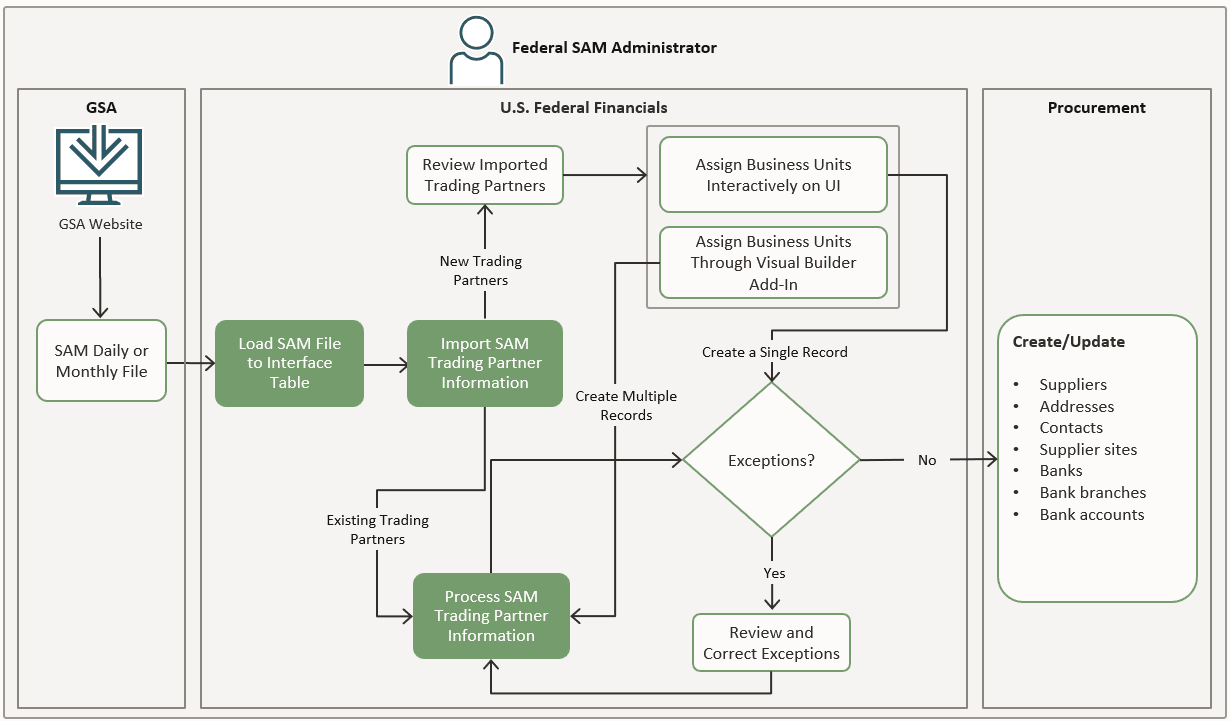
The following illustration and the steps that follow describe the SAM supplier process in Federal Financials:
-
Download the SAM daily or monthly file from the General Services Administration (GSA) website.
Important: You must download the SAM monthly or daily file version V3 (sensitive extract data). U.S. Federal Financials only supports the data extract file version V3 for sensitive extract data. The other versions, V1 and V2, and types of extract data, public and FOUO, aren't supported. -
Create a .zip file with the SAM DAT file and then load the DAT file into the FV_SAM_TRADING_PARTNER_INT interface table by running the Load Interface File for Import process.
-
Run the Import SAM Trading Partner Information process to import the SAM data into Federal Financials.
-
If there are any new trading partners that require business unit assignments, review the imported trading partner registrations and assign business units to the new records:
- To assign business units to a single record, select the UEI/EFT indicator on the Manage SAM Trading Partners page. On the Manage Business Unit Assignments page, assign suppliers or business units to the UEI-EFT indicators and click Submit. This creates a single supplier record.
- To assign business units to multiple records, use the Oracle Visual Builder add-in for Excel to download the supplier data to a Microsoft Excel spreadsheet and then upload the updated data to U.S. Federal Financials. This action creates multiple supplier records and the SAM data is processed.
- If the imported trading partner records already exist and are processed, the SAM data is automatically updated. If there are errors in the SAM data that's processed, review and correct the data and then run the Process SAM Trading Partner Information process until there are no errors.
- After the SAM data is processed successfully, the following data is created
or updated in Oracle Procurement:
- Suppliers
- Addresses
- Contacts
- Supplier sites
- Banks
- Bank branches
- Bank accounts
How SAM Customer Data is Processed
You can import SAM customer data into Federal Financials and manage SAM trading partners.
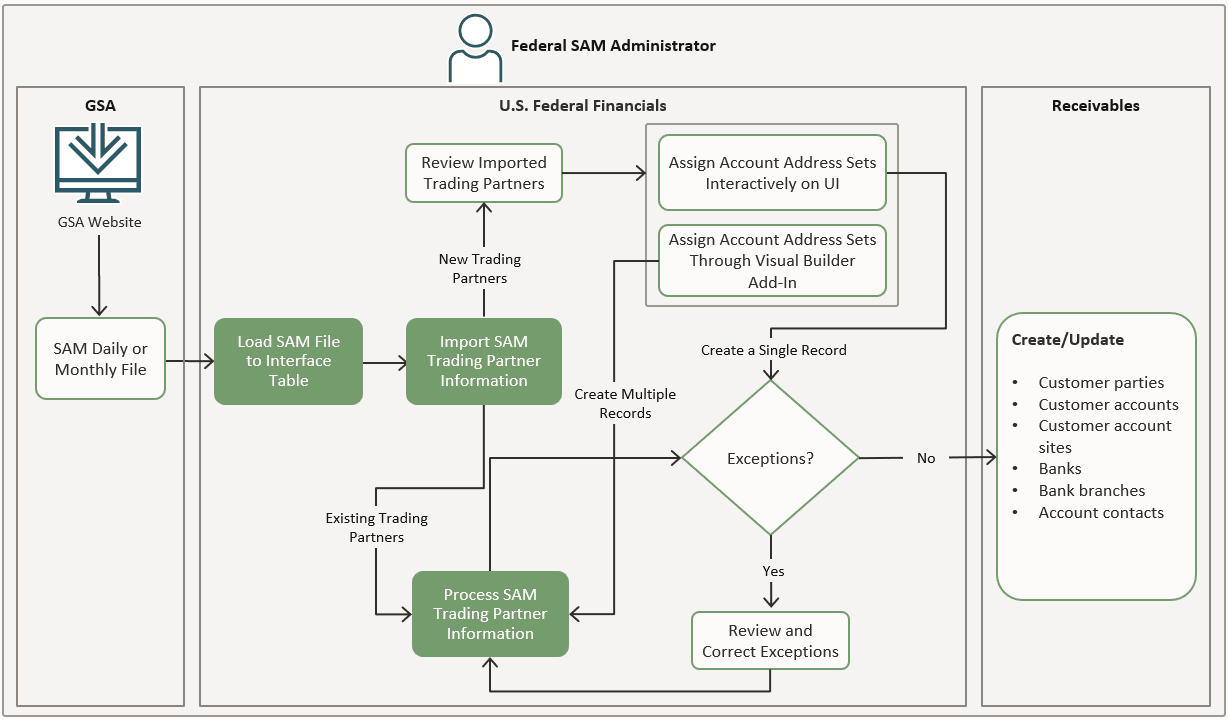
The following illustration and the steps that follow describe the SAM customer process in Federal Financials:
-
Download the SAM daily or monthly file from the General Services Administration (GSA) website.
Important: You must download the SAM monthly or daily file version V3 (sensitive extract data). U.S. Federal Financials only supports the data extract file version V3 for sensitive extract data. The other versions, V1 and V2, and types of extract data, public and FOUO, aren't supported. -
Create a .zip file with the SAM DAT file and then load the DAT file into the FV_SAM_TRADING_PARTNER_INT interface table by running the Load Interface File for Import process.
-
Run the Import SAM Trading Partner Information process to import the SAM data into Federal Financials.
-
If there are any new trading partners that require account address set assignments, review the imported records and assign account address sets and customer accounts to the new records:
- To assign account address sets to a single record, select the UEI/EFT indicator on the Manage SAM Trading Partners page. On the Manage Account Address Set Assignments page, assign account address sets to the UEI-EFT indicators and click Submit. This creates a single customer record.
- To assign account address sets to multiple records, use the Oracle Visual Builder add-in for Excel to download the customer data to a Microsoft Excel spreadsheet and then upload the updated data to U.S. Federal Financials. This action creates multiple customer records and the SAM data is processed.
- If the imported trading partner records already exist and are processed, the SAM data is automatically updated. If there are errors in the SAM data that's processed, review and correct the data and then run the Process SAM Trading Partner Information process until there are no errors.
- After the SAM data is processed successfully, the following data is created or
updated in Oracle Receivables:
- Customer parties
- Customer accounts
- Customer account sites
- Banks
- Bank branches
- Account contacts