Run the Process to Create Credit Memos for Reversed Distributions
You must be an accounts receivable specialist with the Billing Management duty to run this process.
Before you run this process, make sure that the transaction source for joint venture invoice is configured to populate the joint venture name in the credit memo header. See Set Up the Oracle Joint Venture Transactions Source to Populate the Joint Venture Name in Credit Memos.
-
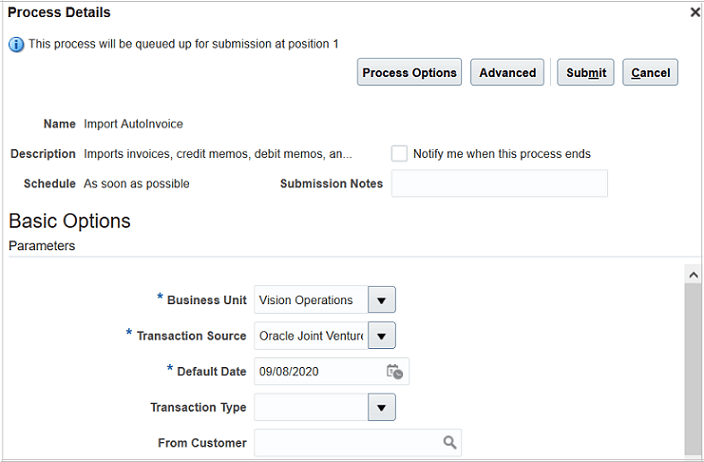
Open Scheduled Processes and access the Import AutoInvoice job.
-
Complete the following required fields:
-
Business Unit. Select your joint venture business unit. The process will create credit memos for reversed distributions associated with this business unit.
-
Transaction Source. Search for and select "Oracle Joint Ventures.” This is the predefined transaction source for joint venture Receivables invoice and credit memo. The process will select only those reversed records that are associated with this transaction source.
-
Default Date. This is the accounting date to apply to credit memos. You can’t run this process without entering a date in this field. However, this date will be ignored for joint venture credit memos and the accounting date that was entered in the “Create Invoices for Joint Venture Distribution Reversals” process will be used instead. If you didn’t specify an accounting date in that process, the last day of the current open period will be used.
-
-
Optionally, specify values in the other fields to filter reversed joint venture distributions that you want to process.
-
Select Submit.