CTA Payables Reclassifications Analysis
If a CTA reclassification payment contains voided payment lines, you can view the details of the new and voided payments in the CTA Payables Reclassifications report.
The CTA Payables reclassifications report is a predefined Oracle Transactional Business Intelligence (OTBI) report where you can view real-time analysis of the reclassification payments included in the CTA bulk file. Use the OTBI analysis report to view historical information about the reclassification payments and their corresponding voided payments.
- Payables Payments - Disbursements Real Time
- Payables Invoices - Transactions Real Time
Before You Run the CTA Payables Reclassifications Report
An administrator must complete the required setup steps before you can run the CTA Payables Reclassifications Report.
For more information, see Before Users Can Run CTA Payables Reclassifications Report.
Run CTA Payables Reclassifications Report
You can run the CTA Payables Reclassifications report from the Reports and Analytics work area.
- From the Reports and Analytics work area, click Browse Catalog.
- On the Catalog page, in the Folders pane, go to .
- Click CTA Payables Reclassifications Report and open the report.
- Set the parameters to be used in generating the report. You can select multiple
values of the parameters.
Here are the report parameters:
Parameter Description Reclassification Status The reclassification status of the payment, for example, Reclassified, To be reclassified, or Not applicable. The default value is To be reclassified. Business Unit The business unit associated with the invoices and the payment. Supplier The supplier associated with the invoices and the payment. Payment The payment number of the reclassification payment. Period The accounting period associated with the payment. - Click Apply.
Here’s an example of the summary view of the CTA Payables Reclassifications Report output:
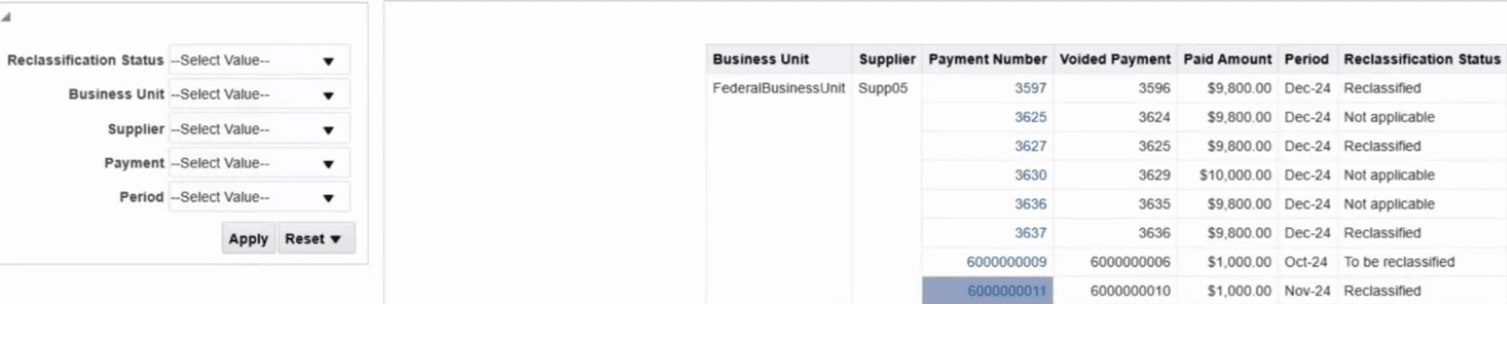
The following table describes the fields reported in the summary view of the report:
Field Description Business unit The business unit associated with the invoices and the payment. Supplier The supplier associated with the invoices and the payment. Payment Number The payment number of the reclassification payment. Voided Payment The voided payment number for the payment. Paid Amount The amount paid for the payment. Period The accounting period associated with the payment. Reclassification Status The reclassification status of the payment. - To drill down to view the payment and invoice details for a reclassification
payment, click the Payment Number link.
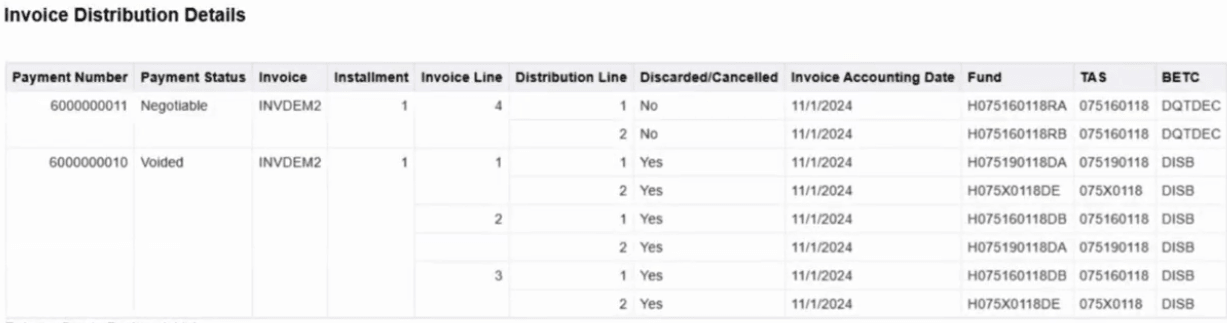
Here’s an example of the detail view of the CTA Payables Reclassifications Report output:
-
The following table describes the fields reported in the detail view of the report:
Field Description Payment Number The payment number of the reclassification payment. Payment Status The payment status of the reclassification payment, for example, Voided or Negotiable. Invoice The invoice number for the new or voided payment. Installment The installment number of the invoice for which payment has been made. Invoice Line The invoice line number for the new or voided payment. Distribution Line The distribution line number for the new or voided payment. Discarded/Canceled Indicates whether the invoice line is canceled or discarded. Yes indicates that the invoice line is canceled or discarded. Invoice Accounting Date The accounting date for the invoice associated with the payment. Fund The fund for the new or voided payment. This is derived from the invoice distribution account code combination. TAS The Treasury Account Symbol (TAS) associated with the fund for the new or voided payment. BETC The payment BETC associated with the invoice line.