Start the Bank Account Validation Flow
Complete this setup to start J.P. Morgan AVS in embedded banking.
Follow these steps:
-
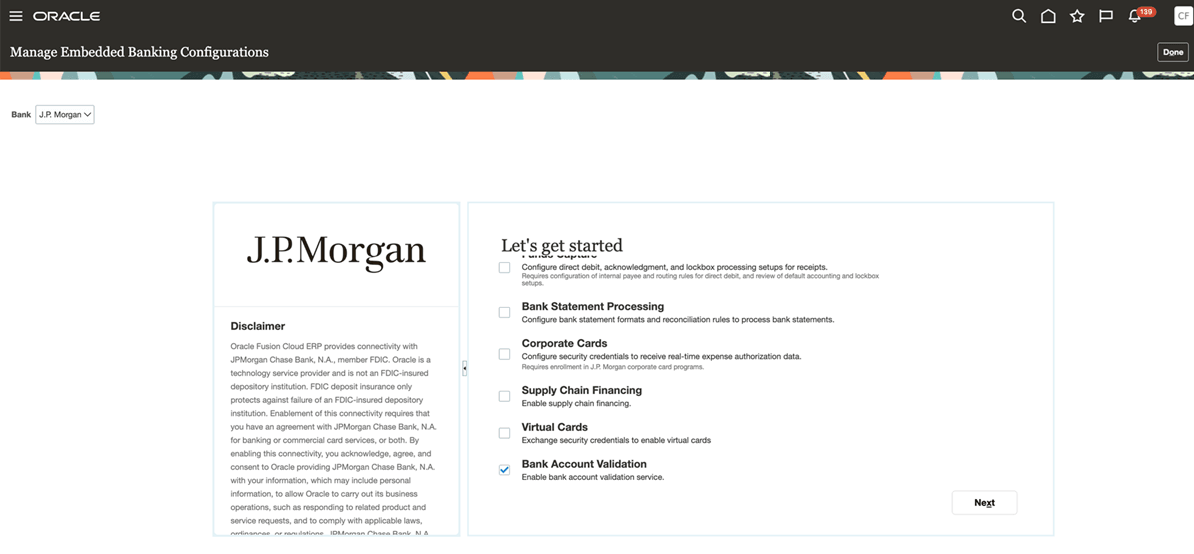
In the Manage Banking Configurations for J.P. Morgan dialog box, enable only
the flows included in the customer's agreement with J.P. Morgan and select Next.
Note: To enable only AVS, select Bank Account Validation.
This screenshot shows the Manage Banking Configurations for J.P. Morgan dialog box.
The J.P. Morgan AVS validation flow starts.
Oracle sends an email with certificates and upload instructions to the administrator who initiated the enablement. The email subject is Action Required: One-Time Security Artifact Upload for J.P. Morgan Services.
Note: If your organization’s email security policy blocks external emails with attachments, you can download the certificate directly from the Onboarding UI. In the Bank Account Validation section, select Download to retrieve the certificate. If the Download option isn’t available or you find issues, contact Oracle Support for help.