Overview of Virtual Card Statement Processing
At the end of the virtual card billing cycle, the card issuer generates a virtual card statement. You are responsible for paying the balance in accordance with your payment terms with the card issuer.
How Virtual Card Statement Processing Works
Virtual card statement processing differs based on the card issuer.
J.P. Morgan Statement Processing
For J.P. Morgan virtual card programs:
- Statements are automatically uploaded into Oracle Cloud ERP the day after your billing cycle closes.
- Transaction lines are automatically reconciled, and the reconciliation field on the payment is updated to Yes.
- Statements are recorded as payment request invoices. Any transaction lines that aren't reconciled to virtual card payments are recorded as a separate invoice. A separate invoice will also be created for charges (for example, forex charges and late fees).
- Business units are assigned to the payment request invoices based on the
following defaulting rules:
- Reconciled transactions use the original payment business unit
(BU).Note: The payment BU must have an invoicing function associated with it. If it doesn’t, then the payment request is created in the default BU configured for that payment instrument.
- If the same payment instrument was used to issue virtual cards across multiple BUs, the card statement will be created as an invoice per BU according to the original payment.
- Any transaction lines that aren't reconciled to virtual card payments are recorded separately under the default BU configured for that payment instrument.
- Reconciled transactions use the original payment business unit
(BU).
- The Unique Remittance Identifier is automatically populated on the invoice from
the data passed by J.P. Morgan in the virtual card statement. Note: Don't modify the Unique Remittance Identifier. Oracle Cloud ERP includes this value in the separate remittance advice (SRA) sent to J.P. Morgan during statement payment processing. J.P. Morgan uses this value to correctly apply the payment.
- To review the Unique Remittance Identifier on the statement invoice for
troubleshooting purposes, follow these steps:
- Go to the Manage Invoices page.
- Open the payment request created for the J.P. Morgan card statement.
- Go to the Installments tab to view the Unique Remittance Identifier field.
- To review the Unique Remittance Identifier on the statement invoice for
troubleshooting purposes, follow these steps:
- When making the card statement payment to J.P. Morgan, the payment must use the
payment process profile (PPP) with the JPM_SRA template and include the Unique
Remittance Identifier in the grouping rules.
- Navigate to the Payments tab for the PPP and ensure the Unique Remittance Identifier option is selected under Document Grouping Rules.
Statement Processing for All Other Card Issuers
For supported card issuers that don't provide automatic statement integration, reconcile statement activity manually.
- Go to Navigator > Payables > Payments.
- From the Tasks panel, select Manage Payments.
- Search for payments by Funding Card Account that are in
Cleared status in the specified date range.
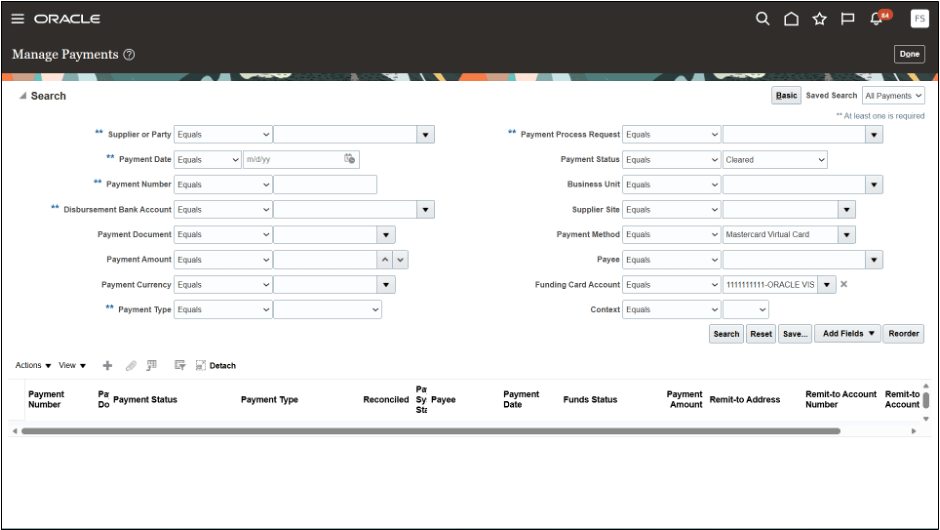
- Export the search results to an Excel sheet to reconcile against the card statement.
- After reconciliation is complete, create an invoice manually to pay your card
issuer for the reconciled transactions.
- If the card issuer is set up as a supplier, create a standard
invoice:
- Enter one line for the total amount of the virtual card transactions.
- On the distribution account combination, enter the account configured as the funding card clearing account on the payment instrument.
- If the card issuer is set up as a party, create a payment request:
- Download the Payables Payment Request Import template.
- Enter the party details, including the source system, source reference number configured on the party, and all other required fields.
- Load the Payables Payment Request template.
- If the card issuer is set up as a supplier, create a standard
invoice:
- Pay your card issuer with the agreed upon payment method.