Configure BI Publisher Data Models and Reports for Enhanced Extracts
Enhanced extracts use a revised BI Publisher integration model that supports the enhanced extracts engine.
To generate report output for enhanced extracts, you need to update the BI Publisher data models so they reference the new enhanced extract output tables. You must also configure BI Publisher reports and associate them with extract delivery options.
Supported Data Models
Enhanced extracts support the following BI Publisher data models.
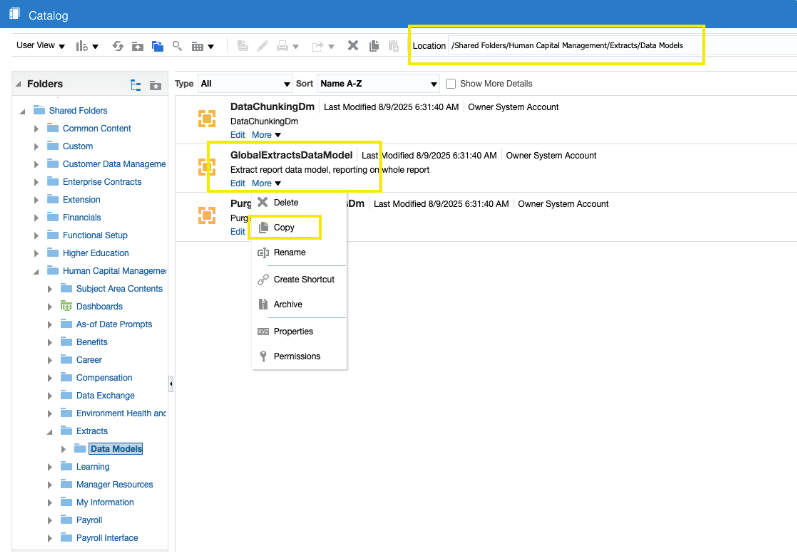
GlobalExtractsDataModel
- Use this data model for extract definitions that run only on the enhanced extracts engine.
- BI Publisher location:
/Shared Folders/Human Capital
                        Management/Extracts/Data Models/GlobalExtractsDataModel
UnifiedExtractsDataModel
- Use this data model for environments that support both earlier extracts and enhanced extracts.
- BI Publisher location:
/Shared Folders/Human Capital
                        Management/Extracts/Data Models/UnifiedExtractsDataModel
Enhanced Extract Output Tables
| Table Name | Description |
|---|---|
| HEX_RUN_SEED_OUTPUT | Stores XML output for seeded extracts for both full and changes-only runs when the retention period exceeds 90 days. |
| HEX_RUN_CUST_OUTPUT | Stores XML output for custom extracts and seeded full extract runs with retention periods less than or equal to 90 days. |
| HEX_RUN_CHG_OUTPUT | Stores XML output for changes-only extract runs. |
Create a BI Publisher Report
- Create a BI Publisher report using the GlobalExtractsDataModel or UnifiedExtractsDataModel data model.
- Save the report definition.
The report can then be associated with extract delivery options.
Configure Extract Delivery Options
After creating the BI Publisher report, configure extract delivery options.
- Open the extract definition.
- Navigate to Extract Delivery Options
- Add a delivery option.
- Specify the following values:
- Report path
- Template name
- Output format
- Save the delivery configuration.
Validate Report Output
Submit the extract definition and verify the generated report output from the View Extract Results page.
- XML output
- BI Publisher formatting
- bursting behavior
- delivery processing
- Report rendering