Prerequisites for Adding an Interview to Fusion Interfaces
There are certain prerequisites for successfully adding an Intelligent Advisor interview to Fusion interfaces. The prerequisites are that:
-
Your Intelligent Advisor Connections administrator has set up a connection to an Oracle Fusion site. For more information, see Create a Connection to Oracle Fusion.
-
You have a Policy Modeling project. If you don't already have a Policy Modeling project, you will need to:
-
Write rules in the project using Word or Excel to model the logic required for the interview
-
Create screens for collecting data in the interview
-
Design the interview to be suitable for Oracle Fusion
-
Test the interview in the Debugger to ensure that your screens are effective and work as expected
-
The Policy Modeling project has:
-
A connection to Intelligent Advisor Hub. For more information, see Specify the Intelligent Advisor Hub for a Project.
-
Data mappings configured for Fusion objects and fields if the interview loads or saves data to Oracle Fusion. For more information, see Data Map to Oracle Fusion, B2C Service, Siebel, Or Another Specific Application. Note that the object that the interview loads the data from must be supported. For more information, see Objects Supported for Oracle Fusion.
-
Been deployed to Intelligent Advisor Hub. For more information, see Deploy a Policy Model.
-
-
In Intelligent Advisor Hub:
-
The API user (that is automatically set up when the Oracle Fusion connection is created), has the Manager role for the workspace that the deployment is included in. For more information, see Update an API client's details.
-
A cross origin request has been authorized for the servers hosting the application that the interview is being embedded in. That is:
-
For interviews embedded in Visual Builder applications, the Visual Builder site needs to be authorized in the Hub. For more information, see Configure Browser Access for Embedded Interviews.
-
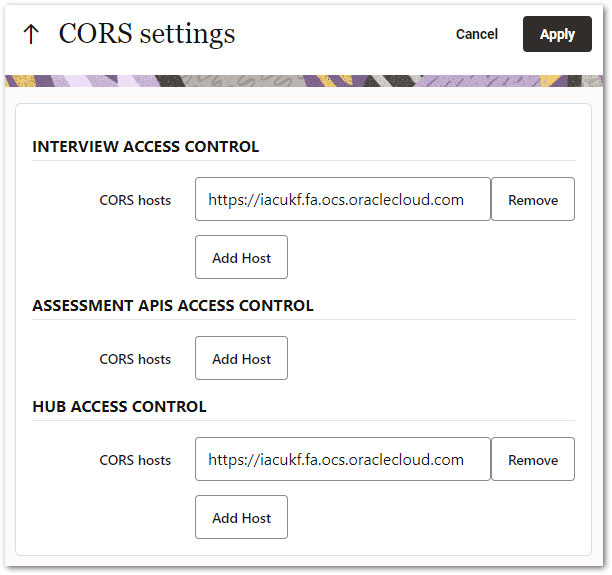
For interviews embedded directly in Oracle Fusion, the Fusion site needs to be authorized in the Hub for both Hub access control (so interviews are listed when authoring in Fusion) and Interview access control (so interviews work at runtime). For more information, see Configure Browser Access Control for Hub REST APIs and Configure Browser Access for Embedded Interviews. Note that in these CORS settings, only the host up to and including the .com, needs to be entered.
-
-
The deployment has been activated on the Interview channel. For more information, see Activate a Project.
-