Map Data to and From Other Data Sources In Oracle Integration
When a trigger connection is added to an integration, the Intelligent Advisor adapter builds (or refreshes) the metadata from the data model of the selected interview operation. This allows the data structure defined for an Intelligent Advisor request or response to be mapped to application data in Oracle Integration. Other Oracle Integration connections are used to fetch and store the data for each interview load and save operation.
The mapping information for interview operations is driven by the mapping names provided in Policy Modeling.
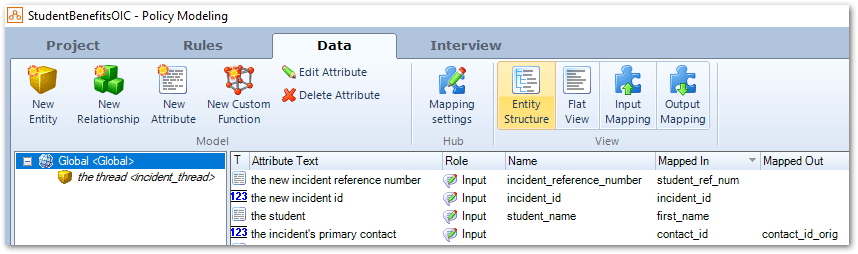
Mappings need to be created in Oracle Integration to define how information from one endpoint is to be transferred to another endpoint.
Tip: To create mappings in Oracle Integration from the source data structure to the target data structure, follow the steps in Access the Mapper in the Using the Oracle Mapper with Oracle Integration guide.
The following sections provide an example of both input mapping and output mapping using Oracle Integration. These examples are not exhaustive.
Load operation
The following is an example of a load operation, where data from an endpoint (for example, an application) is loaded at the start of the Intelligent Advisor interview. There are two mappings in this example: one for the request from Intelligent Advisor to the endpoint and the other with the response from the endpoint to Intelligent Advisor.
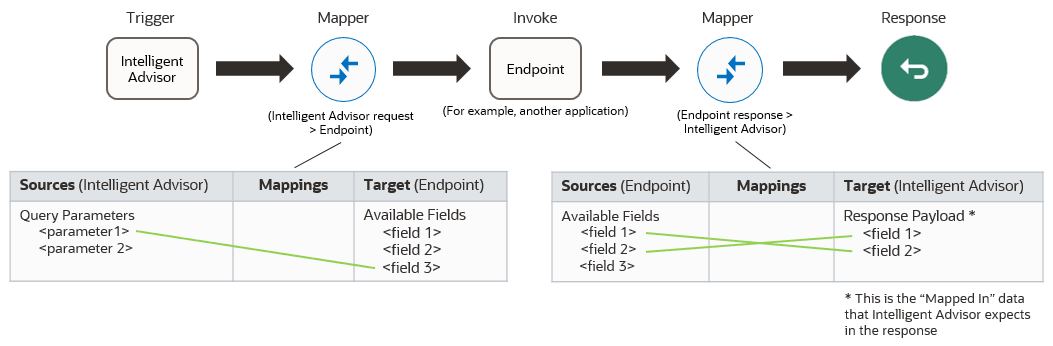
In the request mapping, the Intelligent Advisor request data is presented as the source, as the request is the trigger for the integration. Any query parameters defined in the trigger will appear in the list of available fields for each integration mapping.
In the response mapping, the Intelligent Advisor response data is presented as the target. The target shows the input mapping data structure defined in Policy Modeling.
Define unique identifiers for data returned to the interview
Integrations must return object identifiers for all objects returned to Intelligent Advisor trigger endpoints. There is one id for the global object, and one id for each returned child object instance. These ids provide context for interview save operations. Each id must be unique across all objects of the same type. The content and format of each id is up to the system integrator to define. For example, the identifier of a Contact record retrieved from Oracle B2C Service could be provided as the id value of the matching entity in the response sent to Intelligent Advisor.
Save operation
The following is an example of a save operation, where data from Intelligent Advisor is saved to another endpoint (for example, an application) at the end of a completed Intelligent Advisor interview.
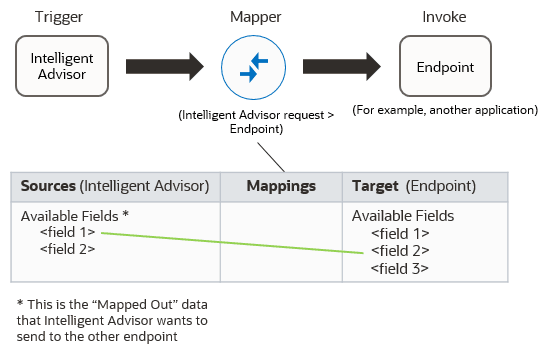
In the request mapping, the Intelligent Advisor request data is presented as the source, as the request is the trigger for the integration. The source shows the output mapping data structure defined in Policy Modeling.
In some circumstances, a response from the endpoint is expected by Intelligent Advisor (for example, in a Load after submit operation). This would work in the same way as the response outlined in the Load operation section above with a second mapping and unique identifiers for response data.
Any query parameters defined in the trigger will also appear in the list of available fields for each integration mapping.
Mapping attachments
When attachments (uploads, forms, signatures and audit reports) exist in the save request payload metadata, these will be shown in the mapper with a property corresponding to each of the attachment types:
-
for uploads:
-
there will be a property corresponding to each upload group using the name defined in Policy Modeling for that upload group, for example, "my_upload_group"
-
the property can occur on the global entity instance or on any child entity instance
-
an entity instance can have zero or more upload groups associated with it
-
the property value will be an array of objects to hold multiple uploaded files
-
each object will have
file_nameanddataproperties
-
-
for forms:
-
there will be a property corresponding to each generated form with the name "generated_forms"
-
the property can occur on the global entity instance or on any child entity instance
-
an entity instance can have at most one generated forms property associated with it (at save time this group will contain all the generated forms for the associated entity instance)
-
the property value will be an array of objects to hold multiple forms
-
each object will have
file_nameanddataproperties
-
-
for signatures:
-
there will be a property corresponding to each signature with the name "signatures"
-
the property can occur on the global entity instance or on any child entity instance
-
the property value will be an array of objects to hold signatures
-
each object will have
file_nameanddataproperties -
at runtime only one signature will be sent for this property
-
-
for audit reports:
-
there will be a property corresponding to the audit report with the name "audit_reports"
-
the property can only ever occur on the global entity instance
-
the property value will be a single object (not an array) with
file_nameanddataproperties
-