Map Data to and From a Policy Model In Oracle Integration
When an outbound endpoint is saved, the Intelligent Advisor adapter in Oracle Integration will build (or refresh) the metadata from the data model of the selected policy model. This allows the data from an incoming request to be mapped to the structure required by the Batch Assess REST API for the configured policy model, and allows the response from the Batch Assess REST API to be mapped to the integration response flow.
You can map in data for one or multiple cases in each invocation, and return data for all chosen outcomes, for each case.
Tip: To create mappings in Oracle Integration, follow the steps in Access the Mapper in the Using the Oracle Mapper with Oracle Integration guide.
Input mappings
When input mapping, assess operations are presented as the target, as they are invoked by the integration. You map data into a cases element. Fields are mapped on to Intelligent Advisor attributes. Multiple cases are supported. Entities and relationships are also fully supported.
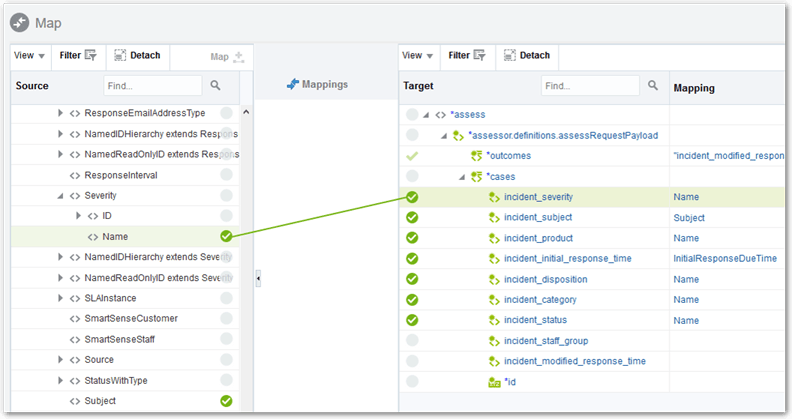
Note that you must specify the list of outcomes. Only the requested outcome attributes are returned. You can define outcomes statically, or dynamically in the integration.
Output mappings
When output mapping, assess operations are presented as the source, as the integration is receiving a response. You map data out of the cases element. Only outcome attributes chosen on input will contain data values on output. The mapped out values will be populated for every case. For attributes that belong to entity instances, the values are returned for every entity instance.
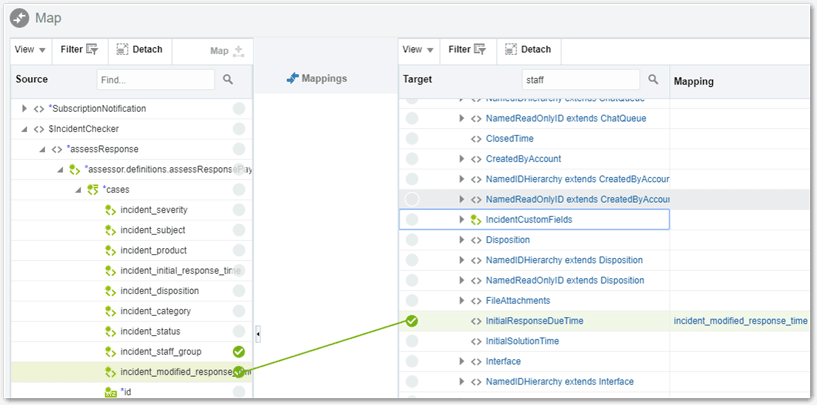
If the value of a property might be null, you must manually identify it as nullable in the mapping. To do this:
- Click the name of the source field in the target Mapping column. The Build Mappings window is displayed.
- Insert a new child element to the top-level mapping element.
- Open the Mapping Components view in the left hand pane.
- Open the XSL Elements folder.
- Drag and drop the attribute name='xsi:nil' element into the empty child element in the right hand pane.
Oracle Integration is unaware of any changes made to a policy model in the connected Intelligent Advisor Hub instance. If a policy model is updated, deleted, or deactivated, the endpoint must be manually edited before the mapping metadata is refreshed.