See Which Projects and Deployments Use a Decision Service
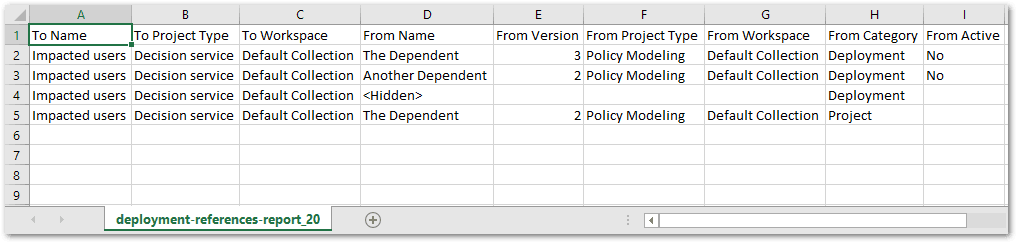
You can see which projects and deployments are using a deployed decision service by generating a References Report from Intelligent Advisor Hub. (You can also get this information via the Deployments REST API.) The report shows:
- the deployed decision service project (To Name column)
- the project type (To Project Type column)
- the workspace for the decision service (To Workspace column)
- the project or deployment that uses the decision service (From Name column)
- the latest project version (From Version column)
- the project type (From Project Type column)
- the workspace for the project or deployment that uses the decision service (From Workspace column)
- the category for the project that uses the decision service (From Category column)
- the status of the project or deployment that uses the decision service (From Active column)
Note that project and deployment names in the report will show if the project is in a namespace (<name> in namespace <namespace>).
To get an references report from Intelligent Advisor Hub:
- In Intelligent Advisor Hub, navigate to the Deployments Page.
- Click the deployment name. The deployment details page is displayed.
- Click the Actions menu and select References report. The report is generated and downloaded as a csv file that can be opened in Microsoft Excel.