Control the Behavior of the Mobile Application
Intelligent Advisor Flows was only made available to select customers, and will not be made Generally Available.
In a mobile application created using the Intelligent Advisor mobile application template, several constants are used as configuration properties to control the behavior of the application. These all have default values that enable the mobile application to function.
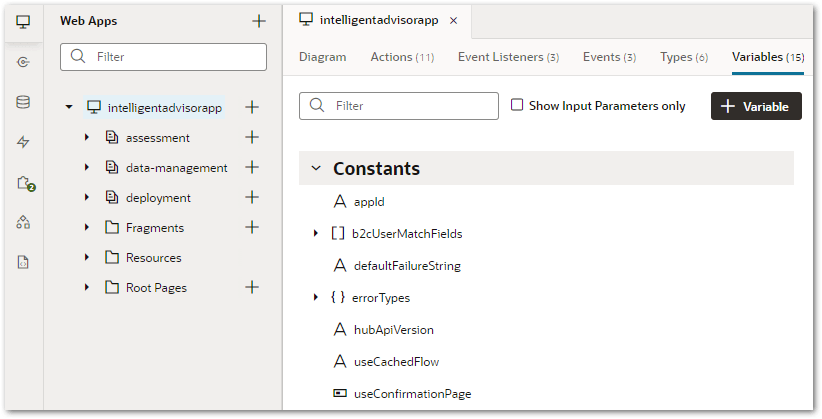
To change the default values for these application constants:
-
In Visual Builder, click on the intelligentadvisorapp application.
-
Select the Variables tab.
-
Under Constants, select the setting you want to change:
-
b2cUserMatchFields
-
hubApiVersion
-
useCachedFlow
-
useConfirmationPage
Note that the other constants (appId, defaultFailureString and errorTypes) should not be changed. All constants are explained in Table 1.
-
-
In the right-hand Properties pane, change the default value as required.
|
Variables |
Type |
Description |
Default value |
|---|---|---|---|
|
appId |
string |
The Intelligent Advisor mobile application instance identifier |
The template uses the application's name, version and Visual Builder host to determine the default value |
| array |
The matching mechanism between the Visual Builder's Identity Cloud Service user account and the B2C Service user account, so that only the assessments assigned to the B2C Service user account are pulled into the Visual Builder application signed in with the matching Identity Cloud Service user. Two matchers are added by default:
Note that the order of the matchers in the b2cUserMatchFields array is important. The next matcher is only used when no match is found with all previous matchers. |
[
    "email",
    "lookupName"
]
|
|
|
defaultFailureString |
string |
The string used by the template to identify a failed action chain invocation |
__FAILURE__ |
|
errorTypes |
object |
The list of error condition identifiers used by the template's global error handler |
{
    "b2cCreateAssessment": "b2cCreateAssessment",
    "b2cCreateIncident": "b2cCreateIncident",
    "getAllDeployments": "getAllDeployments",
    "noOfflineDataFound": "noOfflineDataFound",
    "startSession": "startSession",
    "boCreateAssessment": "boCreateAssessment",
    "login": "login",
    "b2cGetAssessmentById": "b2cGetAssessmentById",
    "deleteAssessmentFromBO": "deleteAssessmentFromBO",
    "deleteAssessmentFromB2C": "deleteAssessmentFromB2C",
    "boUpdateAssessment": "boUpdateAssessment",
    "b2cUpdateAssessment": "b2cUpdateAssessment",
    "b2cGetAssessmentStatusById": "b2cGetAssessmentStatusById",
    "createAttachment": "createAttachment",
    "getAllAssessmentFromBO": "getAllAssessmentFromBO",
    "getAllassessmentFromB2C": "getAllassessmentFromB2C",
    "getSampleContacts": "getSampleContacts",
    "b2cGetContacts": "b2cGetContacts",
    "getSampleCountries": "getSampleCountries"
}
|
|
hubApiVersion |
string |
The Hub API version |
12.2.28 |
| useCachedFlow | string | The switch used to force the application to only run using flow models that have been cached locally. When set to always, the application will not fetch the latest deployed flow model to refresh the local flow model cache, even when the application is online. For more information, see Customize the Support for Offline Data Actions In the Mobile Application. | offline |
|
useConfirmationPage |
Boolean |
Indicates whether the application runs assessments with a confirmation page group |
false |