Resume Saved Interview Checkpoints
As part of the process of enabling interviews to be saved and resumed using checkpoints, the application that holds the checkpoint data needs to provide a way to resume the saved interview as appropriate.
For example:
- On a user’s home screen, you could show "in progress" applications, and provide a resume link for each one.
- On a particular task screen, the link to start an assessment interview could change to a resume link if the application notices a checkpoint is available for the current user.
Note that this step should be performed after a web service connector has been developed to receive, store and retrieve checkpoint data, and the policy model has been configured to create the checkpoints.
The resume session URL is used to resume an interview from a checkpoint.
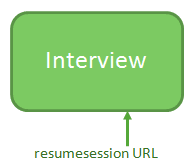
The URL is in the form of:
<site>/web-determinations/resumesession/<deployment-name>/?<parameters>
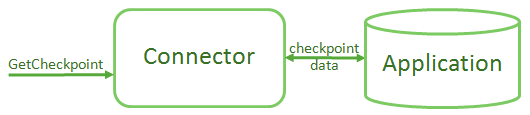
The URL parameters are passed on to the GetCheckpoint action. The parameters should indicate which checkpoint to resume, and can take any form. The GetCheckpoint action must:
- Load and return checkpoint data. Use the provided URL parameters to retrieve the appropriate checkpoint data from the application database and return it.
- Apply security. Return an error if the requesting user does not have permission to resume the checkpoint that is identified by the provided URL parameters.
The interview resumes from where the checkpoint was made. This means that:
- Whenever possible, the interview is resumed exactly where it was left off. This is the point immediately after the screen that triggered the checkpoint, in other words, the next screen in the flow. (To create a checkpoint that resumes on the current screen instead, you need to use an interview extension. To do this you would use the interview.submit() method with the resumeOnCurrentScreen option, which is triggered by listening to the onNavigated event.) For an interview that was completed, resume can be a convenient way to return to the summary of the interview outcome. Note that any data that has been submitted to the connected application will be read-only when the interview is resumed.
- If policy models have changed, a best effort is made to resume. If screens have been deleted, or the order has changed significantly, the interview may be resumed at any visible screen. If the policy model data model has changed so that session data cannot be loaded, then an error is shown. If fundamental mapping changes have been made for entities between policy model versions, data may be transferred from the rows of the previous mapped table to rows of the newly mapped table. To avoid this, the entity name should be changed to ensure that data collected from loaded instances is dropped when old checkpoints are resumed.
- Applications should provide a way to delete invalid checkpoints, or the policy model should be corrected so saved checkpoints can always be resumed.
If the session is unable to be resumed an error is displayed. The text of this error can be configured. For more information, see Built-in error text settings.
The order of data loading on resuming an interview is as follows:
- Data contained in the checkpoint
- Seed data (if refreshing seeded data is supported)
- Any values seeded via URL parameters
Data loaded later in the process will override any previously loaded data.