Set Password Policies
Password policies for Intelligent Advisor Hub are set by the Permissions administrator. Password policies apply to all Hub users and cannot be applied to individual users. (Note that password policies do not apply to Identity Cloud Service API clients.)
To specify the password policies:
- In Intelligent Advisor Hub, navigate to the Permissions Page.
- In the Actions menu, select Password policies.
- On the Password policies page, change the following as required:
- Number of invalid logins (must be a number between 0 and 100)
- Locked accounts automatically unlock after (minutes). If set to 0, user accounts will not be unlocked by the system.
- Password expiry (days) (must be a number between 0 and 100)
- Password expiry grace period (days) (must be a number between 0 and 100). This is the number of days after the password expires that the user can successfully log in to the Hub using the expired password. For example, if the password expiry is 30 days, and the password expiry grace period is 5 days, then the user will be able to log in up to 35 days after the previous password change. During the grace period, the user must change their password immediately after login. After the grace period, the user must have their password reset by a Permissions administrator.
- Password expiry warning (days) (must be a number between 0 and 100). This is the number of days prior to expiry that the user will be warned to change their password. For example, if the password expiry is 30 days, and the password expiry warning is 5 days, then the user will start seeing expiry warnings 25 days after the previous password change.
- Minimum password length (must be a number between 0 and 100)
- Maximum character repetitions (must be a number between 0 and 100)
- Maximum character occurrences (must be a number between 0 and 100)
- Minimum lowercase characters (must be a number between 0 and 10)
- Minimum uppercase characters (must be a number between 0 and 10)
- Minimum special characters (must be a number between 0 and 10)
- Minimum number and special characters (must be a number between 0 and 10)
- Number of previous passwords (must be a number between 0 and 100). This is the number of passwords that cannot be reused when changing the current password.
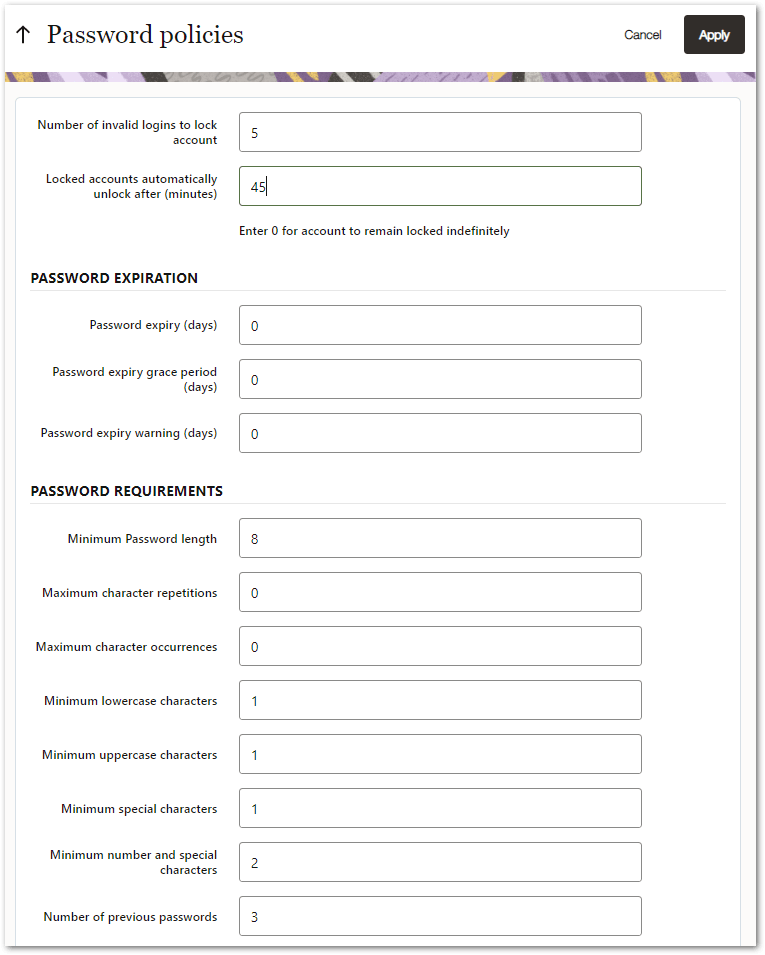
- Click Apply to activate the policies.