Create a Record List That Combines Unique Sets of Records
When writing rules in a decision service or flow project, you can use the Combine function to take a set of record or record lists of the same object type and return a new record list containing the unique set of all the record in the provided parameters.
The syntax for this function is:
-
Combine(record or record list 1, record or record list 2, ... record or record list n)
For example:
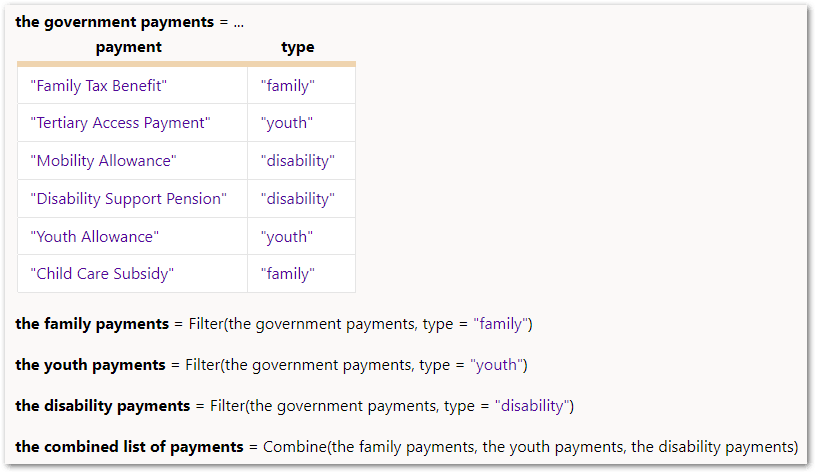
In this example, the combined list of payments would be a record list with 6 records:
-
Family Tax Benefit
-
Child Care Subsidy
-
Tertiary Access Payment
-
Youth Allowance
-
Mobility Allowance
-
Disability Support Pension
The Combine function could be used where an applicant makes a selection, for example, choosing their first, second and third choices from a list of university courses, and then this creates a new record list of the applicant's ranked university courses.
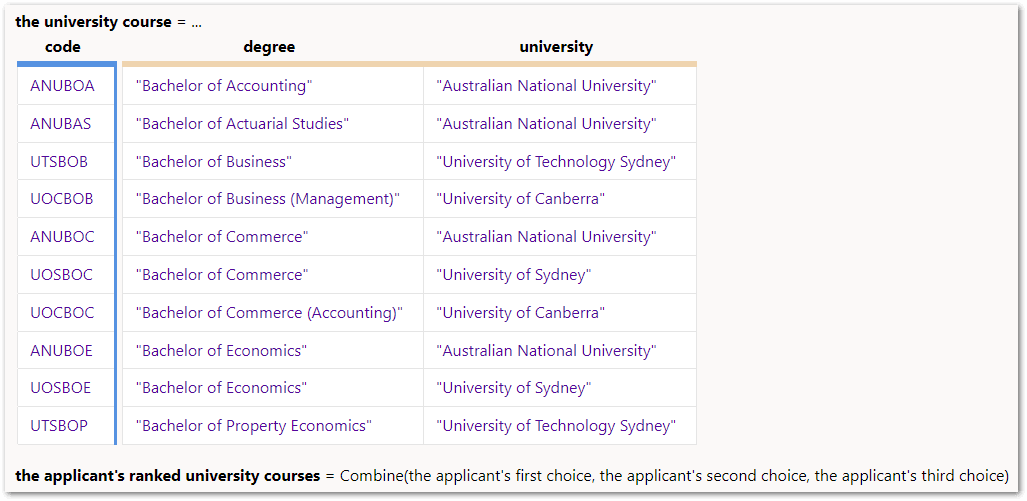
In this example, if an applicant selects:
-
First choice degree: Bachelor of Commerce
-
First choice university: Australian National University
-
Second choice degree: Bachelor of Economics
-
Second choice university: University of Sydney
-
Third choice degree: Bachelor of Business
-
Third choice university: University of Technology Sydney
then the applicant's ranked university courses would be a record list with 3 records:
-
ANUBOC/Bachelor of Commerce/Australian National University
-
UOSBOE/Bachelor of Economics/University of Sydney
-
UTSBOB/Bachelor of Business/University of Technology Sydney
Note that:
-
The order of the records in the returned record list is determined by the order in which they appear in the provided parameters.
-
Any parameters that evaluate to null are ignored and do not affect the outcome. If all the provided parameters are null, the function returns an empty record list.