Refer to Named Record Instances
There are several ways in which named records from a primary record list may be used and referred to in rules in a decision service or flow project.
Note that named records can come from:
-
External named record lists. For more information, see Define Named Record List References. Note that in some cases, a qualifier may be required to identify the record from an external record list.
-
Object tables if they have an identifier column. That is, rows in an object table which has an identifier column will infer named records. For more information, see Object rules with an identifier column.
-
Inline lists in flows where their name is specified in the 'Value' field. For more information, see Specify input list choices using an inline list.
-
Global input data in flows if there is a identity property on the array, as well as a name for the object in the scheme mapping. For more information, see Map Input Data Into a Flow.
For example, if you had the following object table rule that defines the primary record list "Documents" and has an identifier column "type":
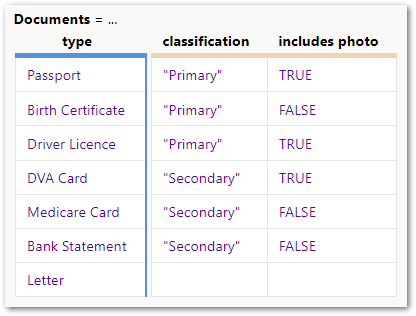
then the inferred records are considered named records and can be referenced in rules using the syntax:
-
<primary record list> : <identifier value>
For instance, you could write rules like this that set references to specific inferred document records:

You can also refer to the identifier as a string value using the syntax:
-
<identifier> = "<string value>"
For example:

Any time where the left side of an equal expression is a reference to a named record, you can compare it using the equality operator. So you could also write:
-
<reference to named record> = <identifier value>
-
<reference to named record> = <primary record list> : <identifier value>
For example, if you had the object rule shown earlier that defines the primary record list "Documents", and you had an input in the flow that collected 'the selected document' (a type of "Documents"):
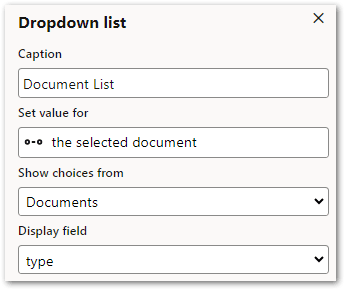
You could write rules like:
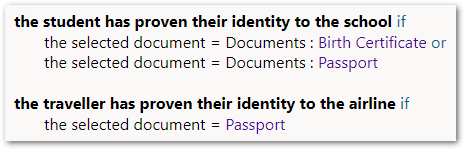
Note that the system knows that if the left hand side of the equals operator is a reference to a named record (in this case, 'the selected document'), then the right hand side has to be another instance of the primary record list (that is, "Documents"). Therefore, it is optional in this rule whether you include the primary record list name before the identifier value on the right hand side of the equals operator. In the rules above, the first rule shows it included whereas the second rule does not. Both forms are valid.
This format also supports the use of the inequality operator:

The reference on the left hand side can include a function. For example:

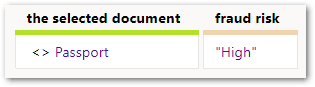
Another way to perform a comparison of a record's identity is as part of a condition column in a table rule. For example:

These condition cells can have a comparison prefix:
Limitations
The following limitations apply to referring to named records in rules:
-
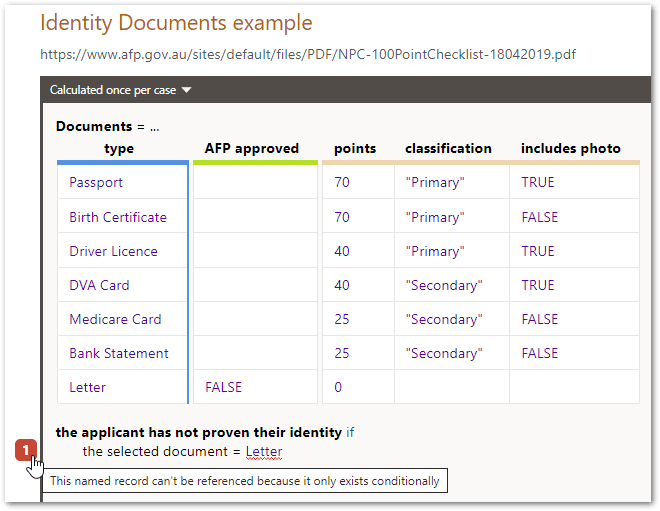
Conditional records (that is, a record whose existence is dependent on a condition being true) cannot be referenced in this way and a rule referring to that record will result in an error:
-
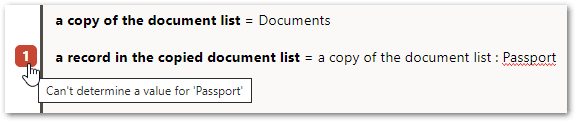
Looking up named records is a special ability reserved for a primary record list. It doesn't work for other record lists, and it will give an error that it can't determine a value for that named record.
-
Non-global named record references are not supported at this time.
-
Record name comparisons must have the reference on the left side and the name on the right side. You cannot swap the order around.