Use Restricted Characters In Field and Record Names In Rules
Fields and named record references in rules are recognized as identifiers which means they are subject to certain limitations. They can only contain:
-
Letters, underscores, percent signs, single quotes
-
Digits (except at the start)
-
Spaces (except at the start or end)
-
'/' or '-' (provided that the previous and next character are also letters or digits. This also means they can't appear at the start or end).
However, there are legitimate scenarios where these "restricted" characters are required in field and record names. For instance, record names from external value lists may contain characters not normally allowed in an identifier.
To allow such characters to be included, backticks (`) can be used as a quoting mechanism for identifiers in rules. The backticks must completely surround the identifier.
An example of backticks used with a field name in a rule:

An example of backticks used with a record name in a rule:

It is important to note that the backtick characters are not part of the actual field or record name.
When to use backticks
When inserting field and record names in to rules using the suggestion pop-up, the name will be automatically added to the rule with backticks if the name requires them.
For example, inserting the following field which contains a "restricted" character (the plus sign):
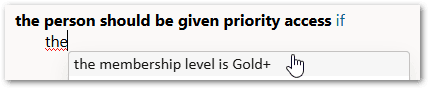
would result in the field being added to the rule automatically with backticks:

If manually typing in a field or record name that includes characters that would normally be considered part of an expression, you will get an error unless you include backticks around the name. For example, typing in "the Fire / Rescue team has been notified" will result in an error because, without backticks, the slash is considered a division symbol.
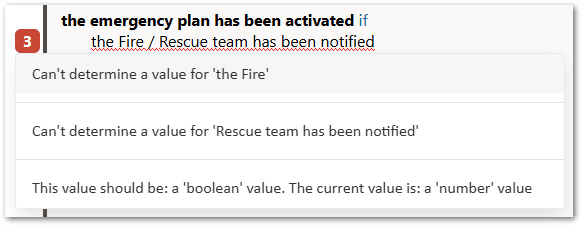
Manually adding backticks around the field name ensures the slash character is identified as part of the name.

Note that the rule block header does show the backticks when indicating which object it is for, because it uses the rule expression for the primary record list of that object.
Backticks should be used with any special keywords, such as (in English language rules) "parent", "null" and "true". These names cannot normally be used as a field name, but with backticks they are recognized as field names rather than their normal keyword meaning.
If a backtick character is required as part of an identifier, it can be included by doubling the backtick. For example, a rule concluding a field called "the email address includes a ` inside" could be written as:

When backticks are not required
Some examples of places where backticks are not needed (and if used, will form part of the actual field name):
-
In the input/output contract: The 'value' property specifying the field the contract field is bound to. Also the input/output name that automatically populates the 'value' property.
-
In table rules: The condition, result and identifier column headers.
-
In the flow editor: Setting the field for an input.
Note also that backticks are not required for a 'qualified' external value list reference (that is, where the record id appears in square brackets after the record name), because the square brackets act as a kind of quotes around the record id. However, in the unlikely event that a ']' appears inside a record id, it can be escaped by doubling it.