Add a New Verb
To add a new verb to the verb file for a project:
- In Policy Modeling, on the Project tab, select the Language subtab.
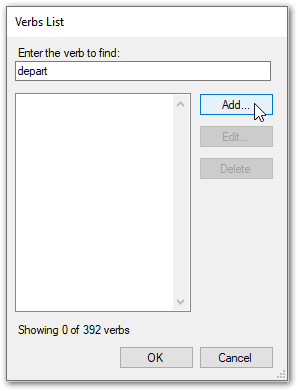
- In the Language section, click the Custom verbs button. The Verbs List dialog will be displayed.
- In the Verbs List dialog box, enter the verb in the find field.
- If the verb is not
shown in the list, click Add to
add it. (If the verb is shown in the list, then it already exists in the verb file and does not need to be added.)
- In the Verb Editor dialog box, press Tab to automatically conjugate the verb.
- Check
that all of the verb forms are correct and update if necessary.
- Click OK
to add the verb to the verb file.
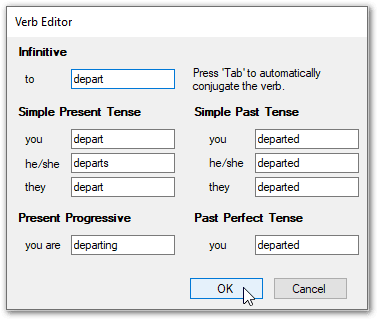
In English:
- the simple present tense is used for habitual actions that are not just happening now
- the simple past tense is used for actions that took place in the past and that are not taking place now
- the present progressive tense is used to express current actions
- the past perfect tense is used for actions that were completed before some other event
Notes:
- Policy Modeling does not recognize the difference between regular and irregular verbs and initially conjugates all verbs as regular verbs. If the verb you are adding is an irregular verb, you must know what form the verb takes for each person and tense so that you can update the verb forms in the Verb Editor dialog appropriately.
- Be particularly careful when adding verbs that have multiple meanings. For example, verbs that are also nouns, like the verb 'to date' which might be unintentionally confused with the noun 'date' in attributes.
- There is no auto-conjugation for new verbs in Dutch. You will need to enter the different verb forms manually.
Modify existing verb forms
To modify an existing verb form:
- In the Verbs List dialog box, enter the verb you want to edit.
- When the verb is highlighted, click Edit.
- In the Verb Editor dialog make the necessary changes and click OK.
- In the Verbs List, click OK.
Delete a verb
To delete a verb from the verbs list for the project:
- In the Verbs List dialog box, enter the verb you want to delete.
- When the verb is highlighted, click Delete. Then click OK.