Load Data for Multi-Channel Interviews
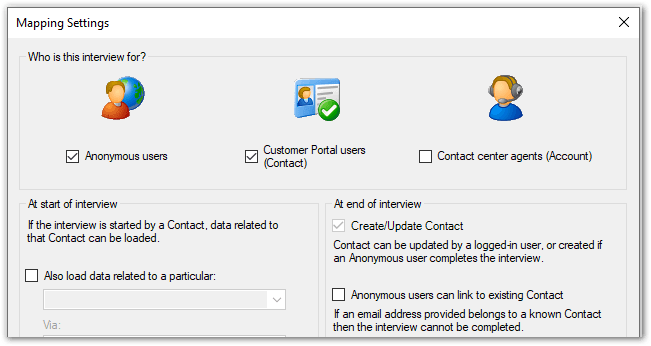
For multi-channel interviews, pre-seeding of data works as follows:
- For Contact and Account interviews: Data related to the Contact can be loaded
- For Anonymous and Contact interviews: If the interview is started by a Contact, data related to that Contact can be loaded.
- For Anonymous and Account interviews: Data for the Account, and for any additional object specified, is available only for logged in agents
- For Anonymous and Contact and Account interviews: Data related to the Contact, and as selected below, is available only for logged in users
To load data for multi-channel interviews:
- On the Data tab in Policy Modeling, click the Mapping settings button.
- In the Mapping Settings dialog, in the Who is this interview for? section, select two or more of the options (Anonymous users, Customer Portal users (Contact) and Contact center agents (Account)).
- In the At start of interview section, specify the required options. Fore more information, see Load Data for Customer Portal Users and Load Data for Contact Center Agents.