Specify Minimum and Maximum Values
Minimum and maximum values can be specified for number, currency, date, time of day, and datetime attributes to ensure that data entered by the user falls within a certain range. Values must be specified in the correct format.
- For numbers and currency, this is the lowest and highest number you wish to allow users to enter. Numbers and currencies (including symbol) can be entered in the format appropriate to the project region.
- For dates, this is the earliest and latest date you wish to allow users to enter. Dates must be in the format YYYY-MM-DD.
- For time of day attributes, this is the earliest and latest time you wish to allow users to enter. Times must be in the format hh:mm:ss.
- For datetime attributes, this is the earliest and latest date and time you wish to allow users to enter. The date/time values must be in the format yyyy-MM-dd HH:mm:ss.
Where the formatting of dates and times are referred to the following conventions are used:
- yyyy refers to a four-digit year
- MM refers to a two-digit month (01 through 12)
- dd refers to a two-digit day of month (0 through 31)
- HH refers to two-digits of hour (00 through 23)
- mm refers to two-digits of minute (00 through 59)
- ss refers to two-digits of seconds (00 through 59)
To specify minimum and maximum values for an attribute:
- On the Data tab, double-click the attribute in the attribute list to open the Edit Attribute dialog.
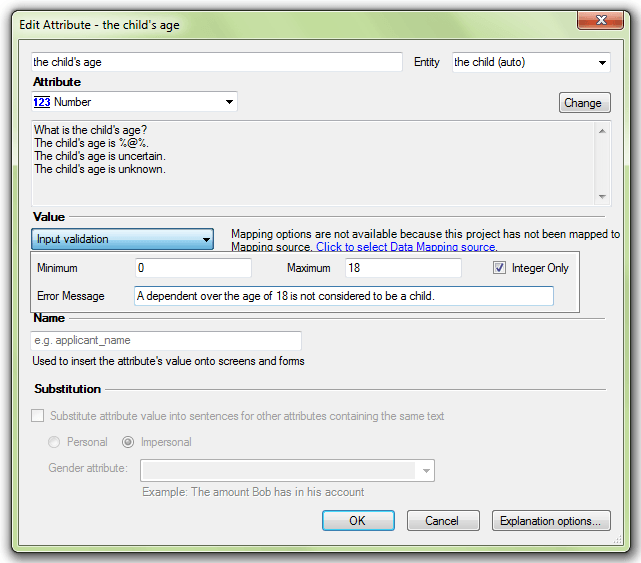
- In the Value section, click the Input validation button.
- In the drop-down window:
- (Optional) Enter the minimum value in the Minimum text field.
- (Optional) Enter the maximum value in the Maximum text field.
- (Optional) Enter a message in the Error Message text field, to be displayed to the user when the validation is triggered. If no message is provided, the default error message "Invalid Value" will be used.
- Click OK.