Create Input Data In a Testing Document
The input data is the set of data from which the actual results of the test case are generated. The input data contains attribute instances and entity instances, along with the values that should be assigned to them. Input data can be created in a test case by adding Input columns to worksheets in the testing document and then providing values for those attributes. To do this:
- In the testing document on the appropriate worksheet, click the Add Columns button.
- In the Add Columns dialog, select the attributes and relationships that you want to include as inputs. You can use the Search field to filter the list of attributes and relationships. You can also sort the attributes and relationships by type by clicking on the Column Type column heading.
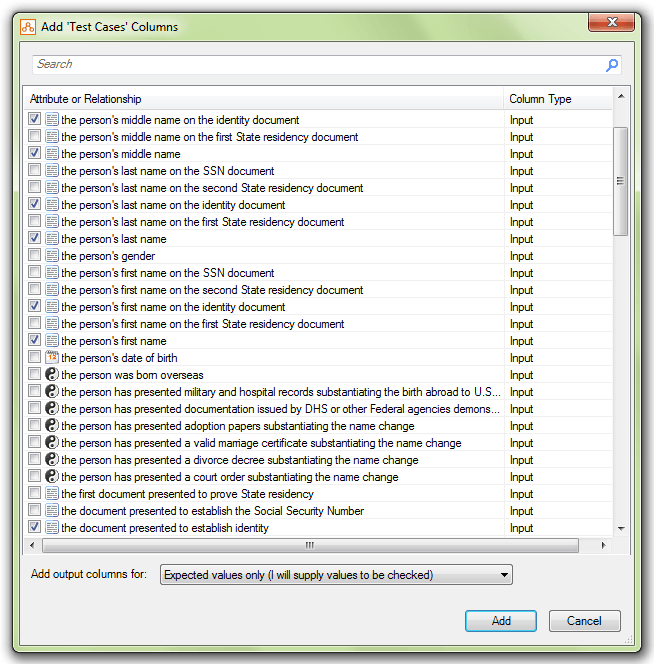
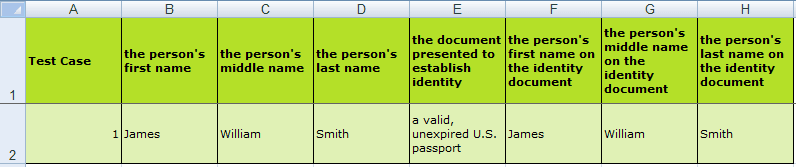
- Click Add. Columns for each of the selected inputs are added to the worksheet immediately after any existing input columns.

You can rearrange the order of the columns using the cut and paste functionality in Excel.
- Enter values for the input attributes, and for relationships specify the entity instances that the test case is to apply to. For more information, see Add Values for Attributes and Relationships.
Note: If a relationship column is not present, then Policy Modeling will just use the available rows for any given test case.
When using (uncertain) and (unknown) values in test cases in other supported languages, use the text provided in the following table. Note that the text is not always the same as the text used for the translation of the unknown and uncertain functions.
| Language | uncertain | unknown |
|---|---|---|
| Bahasa (Indonesian) | (tidak pasti) | (tidak diketahui) |
| Bahasa (Malaysian) | (tidak tentu) | (tidak diketahui) |
| Chinese (Simplified) | (不确定) | (未知) |
| Chinese (Traditional) | (不確定) | (不知道) |
| Danish | (ved ikke) | (ukendt) |
| Dutch | (onzeker) | (onbekend) |
| Finnish | (epävarma) | (tuntematon) |
| French | (incertain) | ( inconnu) |
| German | (unbestimmt) | (unbekannt) |
| Italian | (non certo) | (non noto) |
| Japanese | (不明瞭) | (不明) |
| Korean | (확실하지 않음) | (알 수 없음) |
| Norwegian | (usikker) | (ukjent) |
| Portuguese (Brazilian and European) | (incerto) | (desconhecido) |
| Russian | (не определено) | (не известно) |
| Spanish | (inseguro) | (desconocido) |
| Swedish | (osäkert) | (okänt) |
| Turkish | (belirsiz) | (bilinmiyor) |
Note: Alternatively, input data can be created by setting values for attributes in the Debugger and then exporting the data directly into a test case. For more information, see Create Input Data In the Debugger. The input data in a test case can be used in conjunction with the data loaded from a test data connector file. The test case specifies the data loaded at the start or entered during the interview, and the test data connector file contains data that would be dynamically loaded during the interview. For more information, see Test Dynamically Loaded Data.