Styles Used for Excel Rule Tables
Excel rules need to be marked up using the styles supplied with the Policy Modeling Excel document template. An example rule table is shown below.
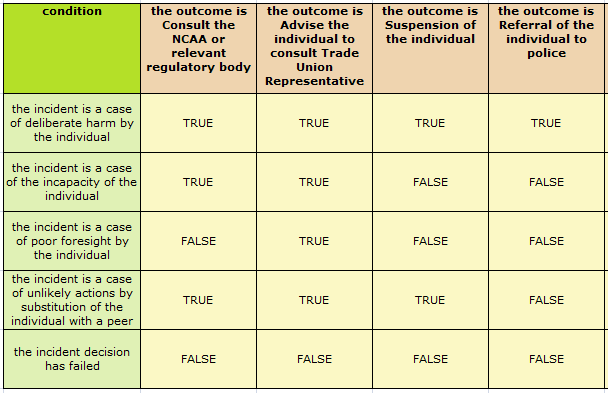
The styles used for writing rules in Excel are explained in the following table.
| Style Name | Use | Notes |
|---|---|---|
|
Conclusion Heading |
Used to mark up a conclusion column in a rule block. |
The text is either "conclusion" or an attribute identifier. To use a generic "conclusion" heading to infer multiple boolean attributes, every boolean attribute in that column needs to readily identified as a Boolean type (that is, it must contain a verb, otherwise the parser will thinks it is a text or number attribute). Where the rule is inferring an entity, the conclusion heading can be the identifying attribute for the entity, or the relationship name. Heading cells are optional. Primary tables have the text "Apply Sheet" as the Conclusion Heading. Note that the text "Apply Sheet" therefore cannot be used as a column heading in a standard rule table. |
|
Conclusion |
Used to mark up an attribute that will be concluded by a rule. |
Where the rule is inferring an entity, the conclusion should be the entity instance. |
|
Condition Heading |
Used to mark up a condition column in a rule block. |
The text is either "condition" or an attribute identifier. Heading cells are optional. |
|
Condition |
Used to mark up a condition for a part of a rule. |
If the condition header is "condition", the condition must be a complete expression or a valid Boolean attribute. If the condition header is an attribute identifier, the condition must be either a constant or a comparison of the same type as the attribute. |
|
Else |
Used immediately to the left of the alternative conclusion |
If present, the alternative conclusion must be the last row in a rule. The alternative conclusion row must not contain conditions. If the alternative conclusion is left blank, it will infer an uncertain value. However, for clarity of rule meaning it is better to explicitly state the intended alternative conclusion. |
|
Commentary |
Used to mark up descriptive text in a rule block. |
The text is ignored when generating the rule. The Commentary style can be used for individual cells or for entire columns. To ignore an entire column, apply the Commentary style to the header of the column. To ignore a specific cell, apply the Commentary style just to that cell. |
Tip: You can use tags in comments on cells to reference the applicable source material. For more information, see Add Reference Tags to an Excel Rule.