Add Reference Tags to a Word Rule
To add a reference tag to a Microsoft Word rule document:
- Place the cursor in a conclusion or condition in a rule.
- Click the Add Tag button on the Oracle Policy Modeling ribbon.
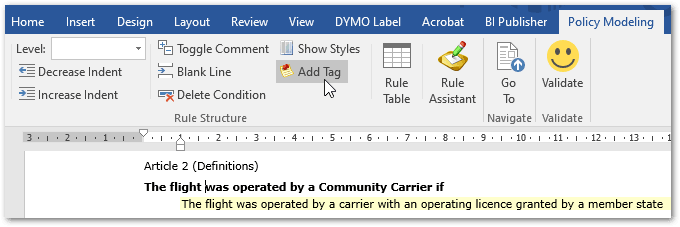
A tag is added in square brackets at the start of the conclusion or condition. The text is selected.
- Type the text that you want for the reference tag. You can have multiple reference tags per line.

- Click Validate to validate the rules.
Reference tags can be used in conclusion and condition cells in Word rule tables. Note that you cannot tag 'otherwise' conditions (you can tag 'otherwise' conclusions).
For example,
| the amount of compensation calculated under Article 7(1) | |
|---|---|
| [Article 7(1)(a)] 250 | the scheduled flight distance is not more than 1500km |
| [Article 7(1)(b)] 400 |
the scheduled flight distance is more than 1500km and either the flight is an intra-Community flight or the scheduled flight distance is not more than 3500km |
| [Article 7(1)(c)] 600 | otherwise |
Tip: To delete a reference tag, select the tag (including the square brackets) and click Delete.