Get the Value of an Attribute
To get the value of an attribute that is associated with a value list and used in a rule with the Text function or with the Concatenation operator, you use the Value function. The function will return the value of the value list item. If the Value function is not used in these circumstances, the display value is returned instead of the actual value.
The syntax for this function is:
- Value(<attribute>)
For example, if you had this rule:
the description of the patient’s pain = "The patient has rated their pain as " + Value(rating) + " out of 10"
where 'rating' is collected with a value list like this:
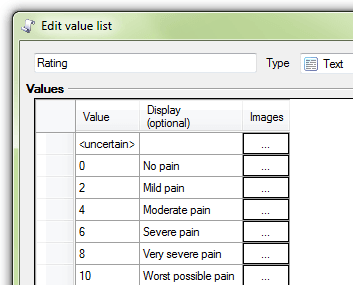
the rule would return the actual value for the 'rating' attribute. For instance, where the user selects 'Mild pain' as the rating in the interview, 'the description of the patient's pain' would be "The patient has rated their pain as 2 out of 10".
Compare this with the rule below where 'rating' is used without the Value function:
the description of the patient’s pain = "The patient has rated their pain as " + rating
This rule returns the display value for 'rating'. For instance, where the user selects 'Very severe pain' as the rating in the interview, 'the description of the patient's pain' would be "The patient has rated their pain as Very severe pain".
Note that:
- A rule that uses an attribute associated with a value list but doesn't use the Text function or concatenation operator will always return the (actual) value, whether you use the attribute with the Value function or not.
- A rule that uses an attribute that is not associated with a value list will always return the (actual) value, whether you use the attribute with the Value function or not.