Email Domain Delegation
Overview
Transactional emails are a core part of any loyalty program and cover things like welcome emails, reward redemption details, and point expiration alerts. Your CrowdTwist instance can be configured to send these emails on your behalf and at no extra charge. By default, these emails are sent from “[your program name]@crowdtwist.com”, but it’s also possible to have them sent from a domain that you own.
Configuring Your Domain
Complete the following steps to send transactional emails from your domain:
-
Contact Oracle Support or your account manager and let them know the domain from which you’d like to send. This will allow our team to start setting up your domain as a verified sender.
-
You will receive a DomainKeys Identified Mail (DKIM) record that your IT team needs to add to your DNS. DKIM is an email authentication method that adds a layer of security to your emails and helps prevent bad actors from impersonating your brand.
-
In addition to DKIM, your IT team will need to configure SPF. This is another DNS entry that helps secure your mail and prevent fraudulent senders. Add records for the Americas and Europe sending regions.
-
Once both DKIM and SPF have been configured, notify Oracle Support or your account manager so they can verify and update your program configuration. Once updated, emails will begin sending from your domain.
-
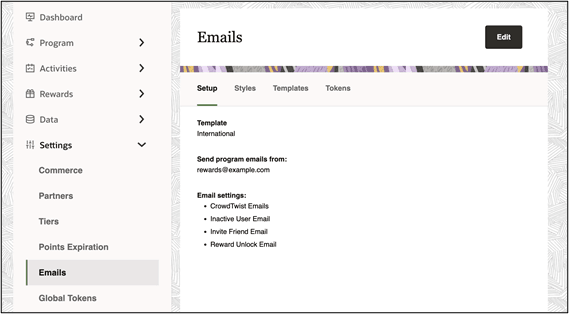
You can confirm the correct sender has been configured by visiting the Settings > Emails page in the Control Center.
Note: Do not update the email sender domain in the Control Center until you have completed all of the above steps, as it will cause email delivery to fail.