Deploy a Bundle
You can deploy a generated bundle in the target environment to revert to the state of artifacts represented by the bundle. The system validates the bundle before attempting any deployment to ensure software and model versions and any other dependencies are met.
For example, if you have a bundle A (created in instance A) and then later made some changes but want to revert those changes, then use the Deploy option. This option restores the artifacts to an older version by deploying the previous bundle in the system.
To use the replace or merge options during deployment, migrate from the branch framework to the sandbox framework. See Migrate to the Sandbox Framework for Semantic Model Extensions.
When you deploy a bundle, if the required pipeline parameters are missing in either the bundle or the target environment, the system won’t run the pipeline. Even if you select all modules (functional areas, data augmentations, custom configurations), they will stay in “Saved” state and won't be scheduled.
If you’re deploying the semantic extensions bundle or the composite bundle, you can either merge or replace the sandbox content and sandbox security in the target environment. When you replace, you delete the existing semantic model extensions in the target environment and migrate the latest bundle. You must confirm the semantic model replacement to prevent unintended content loss. The merge option is helpful when you've deleted items in your source instance and want those deletions to be applied to the target instance. The default, Merge Sandbox Content, combines the changes from your source sandbox instance with the existing content on the target system.
Note:
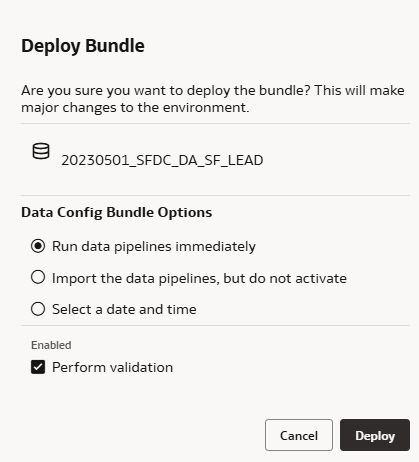
When you deploy a content bundle with Include All or specific My Folders selected, the existing content in the affected My Folders will be replaced with the content from the bundle. Oracle recommends that you create a backup bundle of your current content before you proceed with the deployment.- In Deploy Bundle, if you’re deploying the Data Config bundle, select Perform validation to validate the bundle prior to deployment and click Deploy. If you choose to deselect Perform validation, the bundle deployment will always show a final status of Completed, even if some components failed and were skipped during deployment. If you do deselect this option, it’s recommended you manually validate the deployment by reviewing the bundle reports.