Set Up the Reporting Configurations

Specify the report parameters for your data model file.

  1. In Oracle NetSuite Analytics Warehouse Console, click Reporting Configuration.
  2. On the Reporting Configuration page, click Global Parameters.
  3. In Subsidiary, select a subsidiary to transfer data from that subsidiary.
  4. Optional: Select Manual Execution of Apply System Extensions if you want to run the system steps manually instead of running automatically based on the configurations such as data augmentations, applications, and data applications (for example, Netsuite Account Analysis).
  5. Enable Hide Prebuilt Analyses and select the prebuilt analyses folder to hide.
    While the update is in progress, an UPGRADING status will be displayed. Once completed, the selected folders will no longer be visible in the Oracle Analytics Cloud catalog.
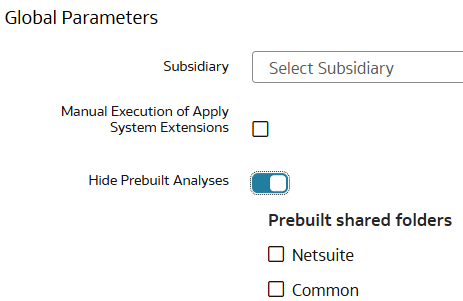
    Global parameters in Reporting Configurations

  6. Click Save.